---
title: "How to Use Takeoff: A General Overview"
description: Takeoff
---
[Skip to content](https://knowledgebase.planhub.com/knowledge/how-to-use-takeoff-general-overview#main-content)
English
Show submenu for translations
[Submit a Ticket](https://knowledgebase.planhub.com/knowledge/kb-tickets/new?hsLang=en)
![NEW\_PlanHub\_Logo\_Navy.png\]](https://knowledgebase.planhub.com/hs-fs/hubfs/Design/PH%20Logos/NEW%202024%20PH%20Logos/NEW_PlanHub_Logo_Navy.png?height=40&name=NEW_PlanHub_Logo_Navy.png)
- [Have an Issue? Submit a Ticket](https://knowledgebase.planhub.com/knowledge/kb-tickets/new)
Open main navigation
Close main navigation
- [Have an Issue? Submit a Ticket](https://knowledgebase.planhub.com/knowledge/kb-tickets/new)
- English
Show submenu for translations
- [Submit a Ticket](https://knowledgebase.planhub.com/knowledge/kb-tickets/new)
What can we help you with?
- There are no suggestions because the search field is empty.
1. [Knowledge Base](https://knowledgebase.planhub.com/knowledge?hsLang=en)
2. [Takeoff & Estimation](https://knowledgebase.planhub.com/knowledge/takeoff-estimation?hsLang=en)
3. [Getting Started](https://knowledgebase.planhub.com/knowledge/takeoff-estimation?hsLang=en#getting-started)
# How to Use Takeoff: A General Overview
## This article will provide you with a clear overview of Takeoff and learn how to navigate its essential tools. It brings clarity and organization to your construction planning and bidding workflow. Here’s how to navigate the takeoff feature and make the most of its tools.
**Prerequisites**: A subscription or trial that includes Takeoff is required to measure plans, export a plan into TakeOff, and set the scale. Then you can begin measuring.
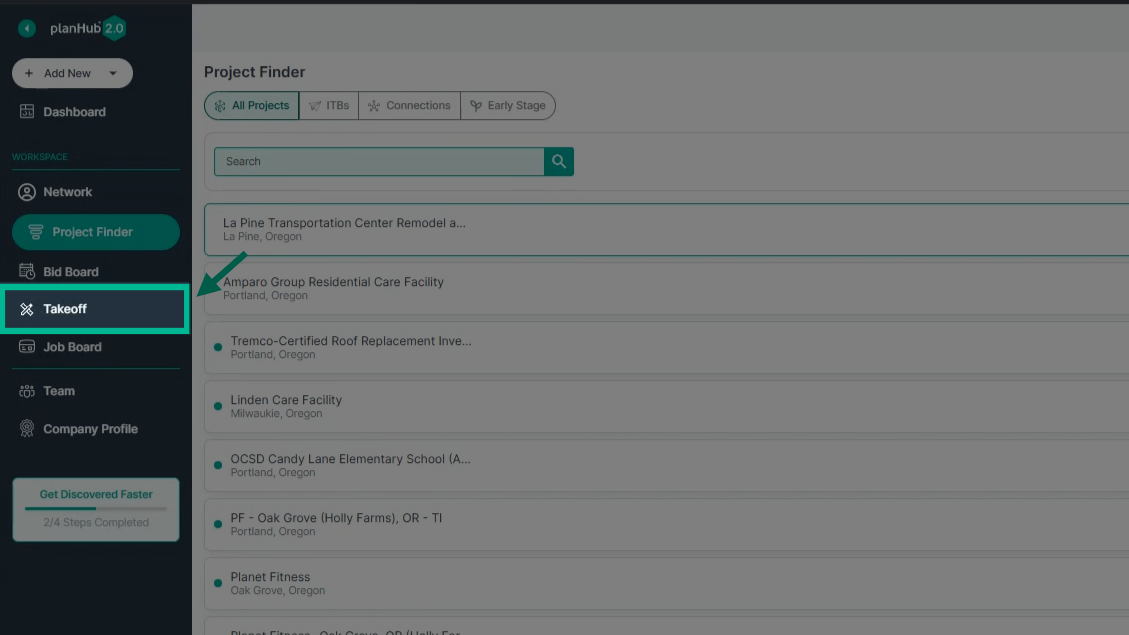
**Step 1: Navigate to Takeoff from the Main Panel**
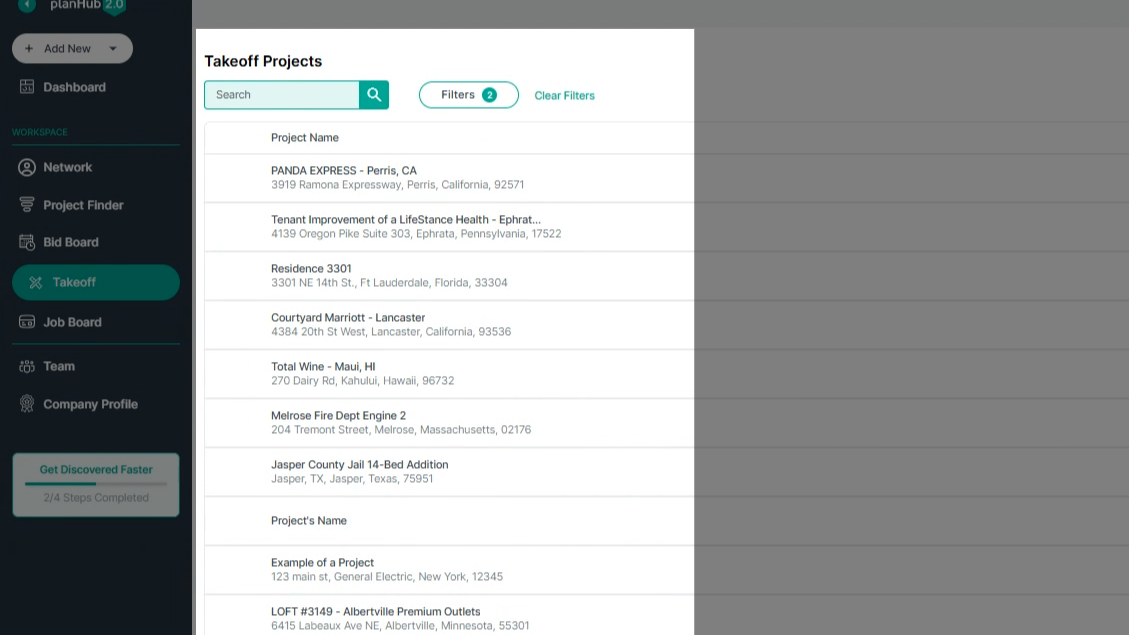
After logging into your account, look for the main panel on the left side of the screen. Click on the **Takeoff** option.
**Step 2: Explore the Takeoff Window**
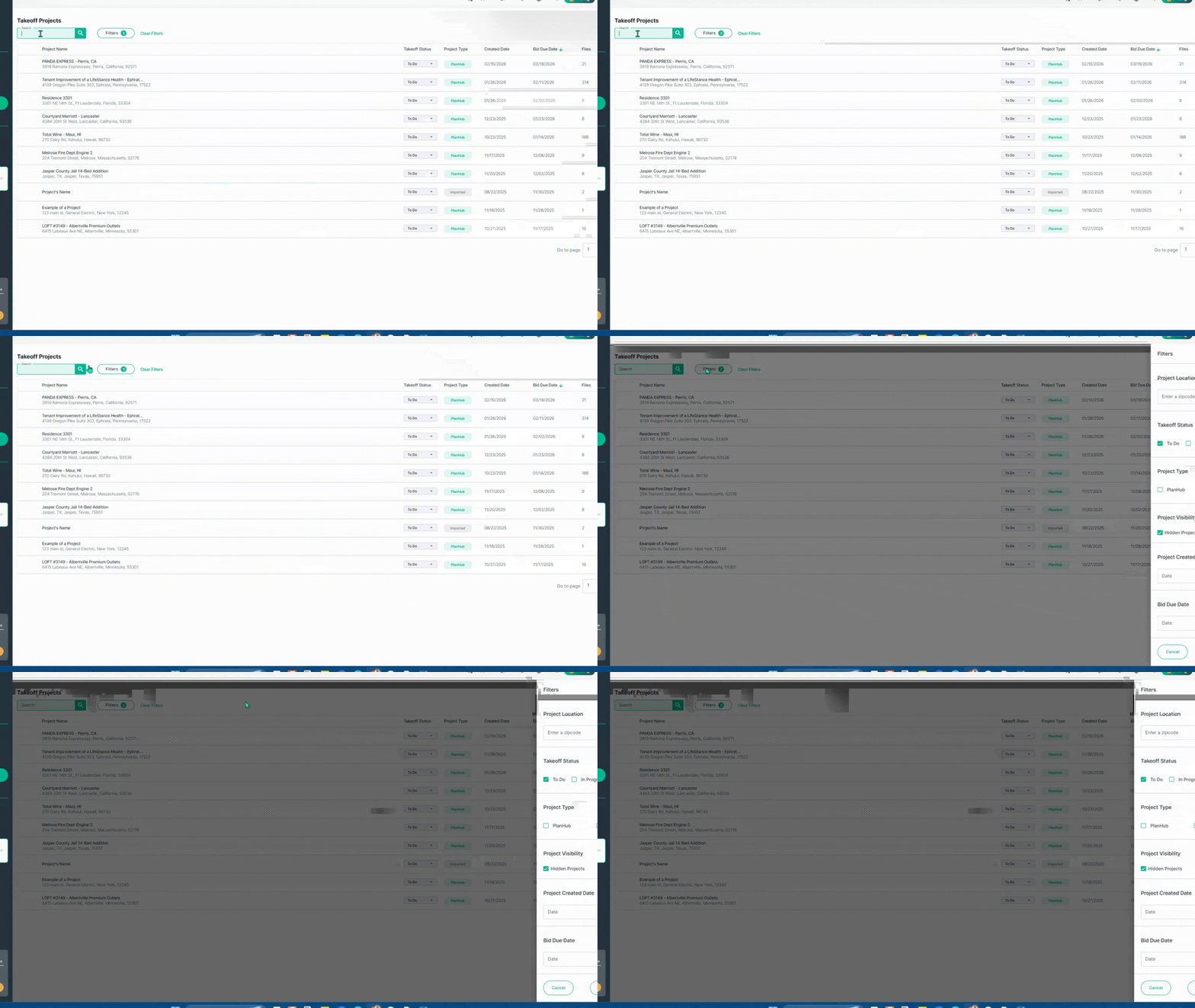
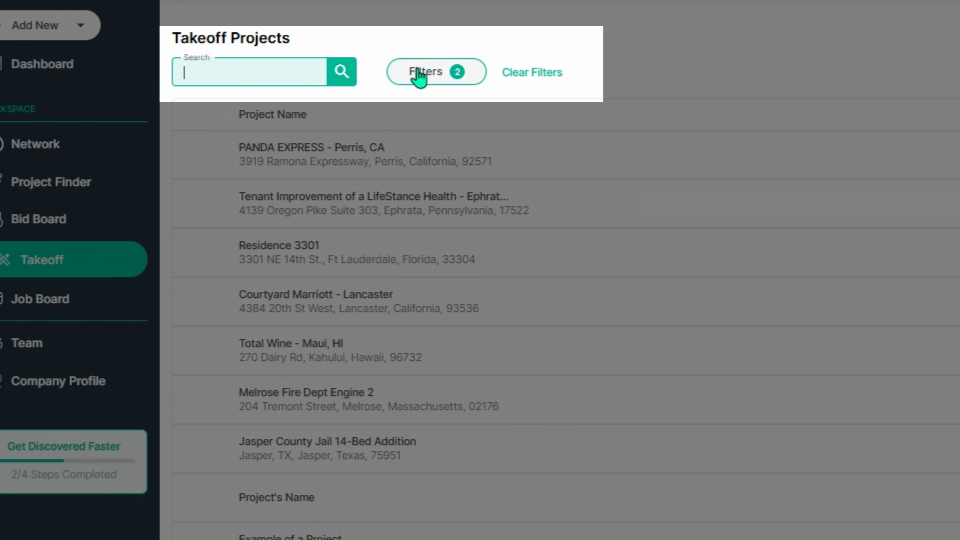
You’ll see the takeoff dashboard. At the top, use the **Keyword Search Bar** to find projects by name, and apply filters using the **Filters** pop-up for more specific searches.
**Step 3: Review Project Details**
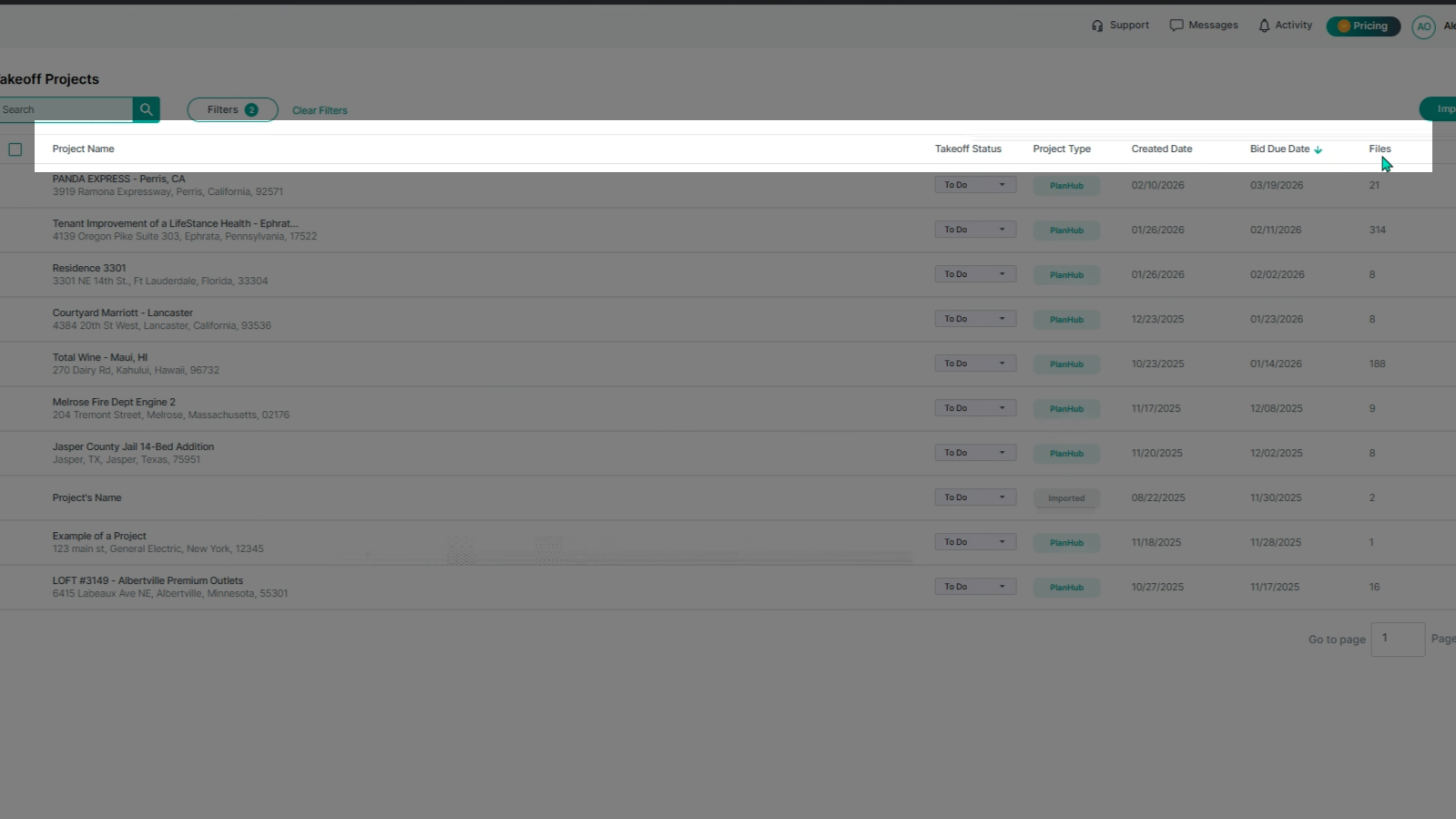
Browse through columns showing the **Project Name**, **Takeoff Status** (set via the dropdown), **Project Type** (planHub or Imported), **Created Date**, **Bid Due Date**, and the number of **Files** for each project. Click the arrows next to each header to sort your project order pertaining to each column.
**Step 4: Expand Projects to View More**
Click the **expansion arrow** for a project to see its files list and access the **View Project Details** option at the bottom.
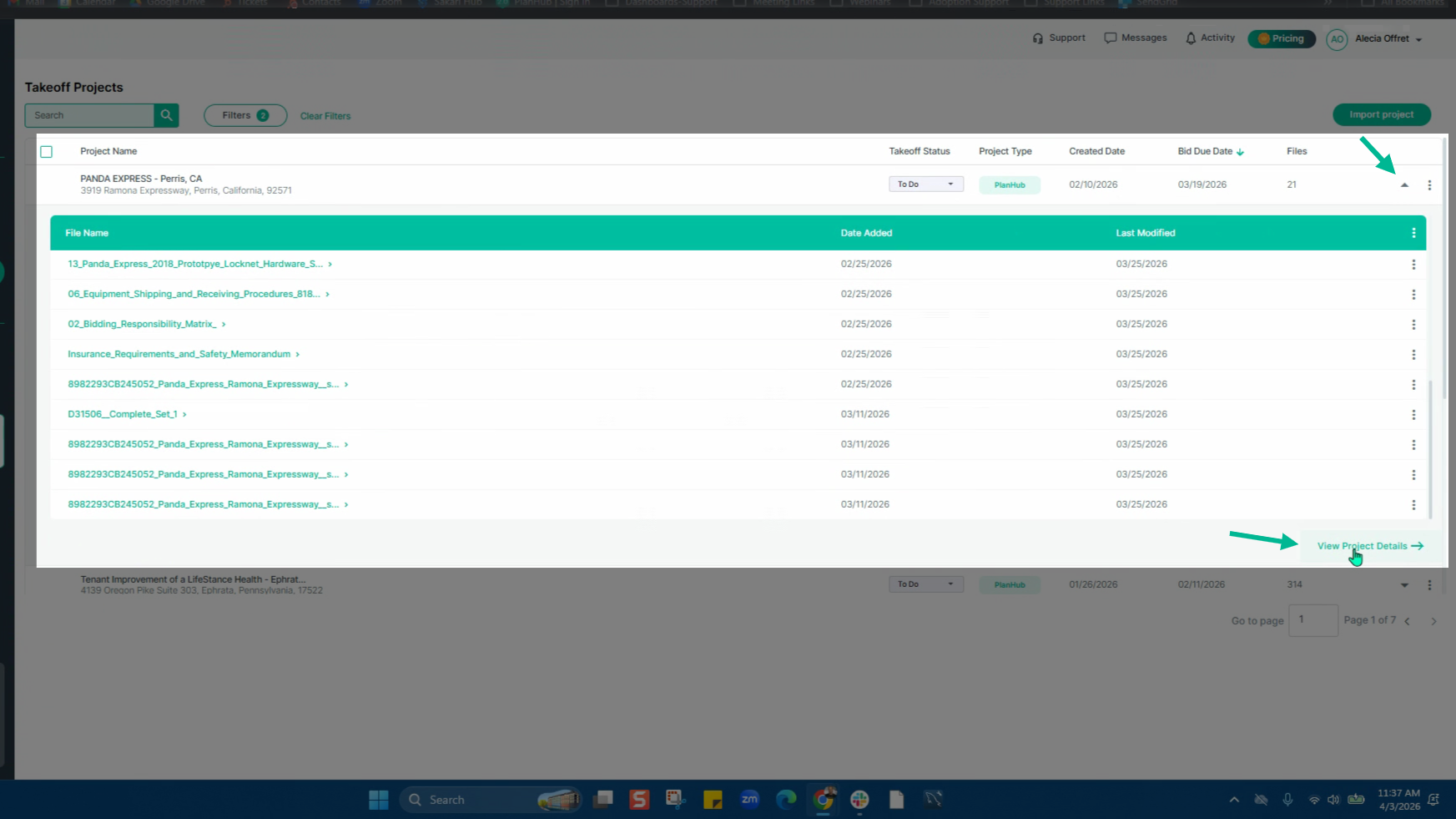
**Step 5: Use the Actions Menu for Projects and Files**
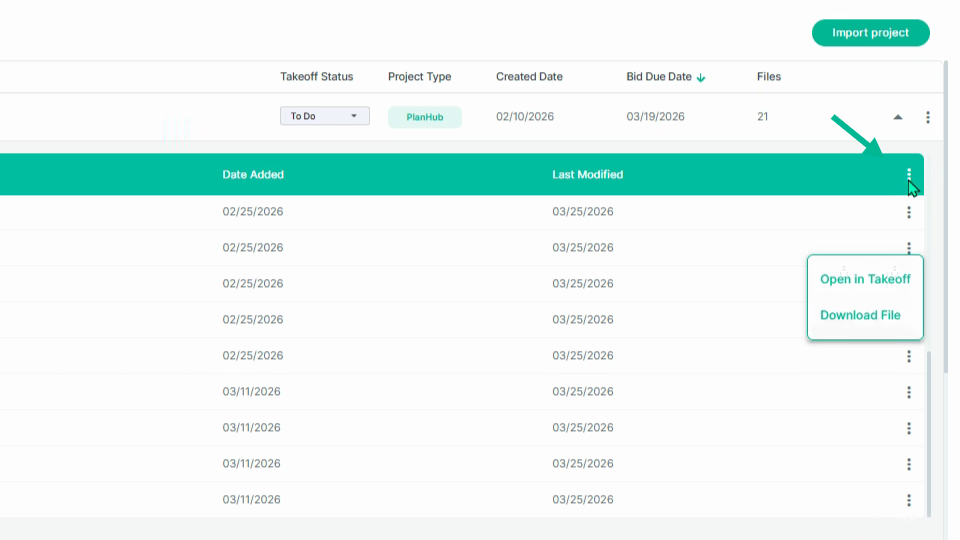
On each project row, click the **three** **dots** on the right for the **actions menu**. Hide, view, or open files in takeoff. Select the Action menu at the end of the project name row to open all files in Takeoff.
**Step 6: Import a New Project**
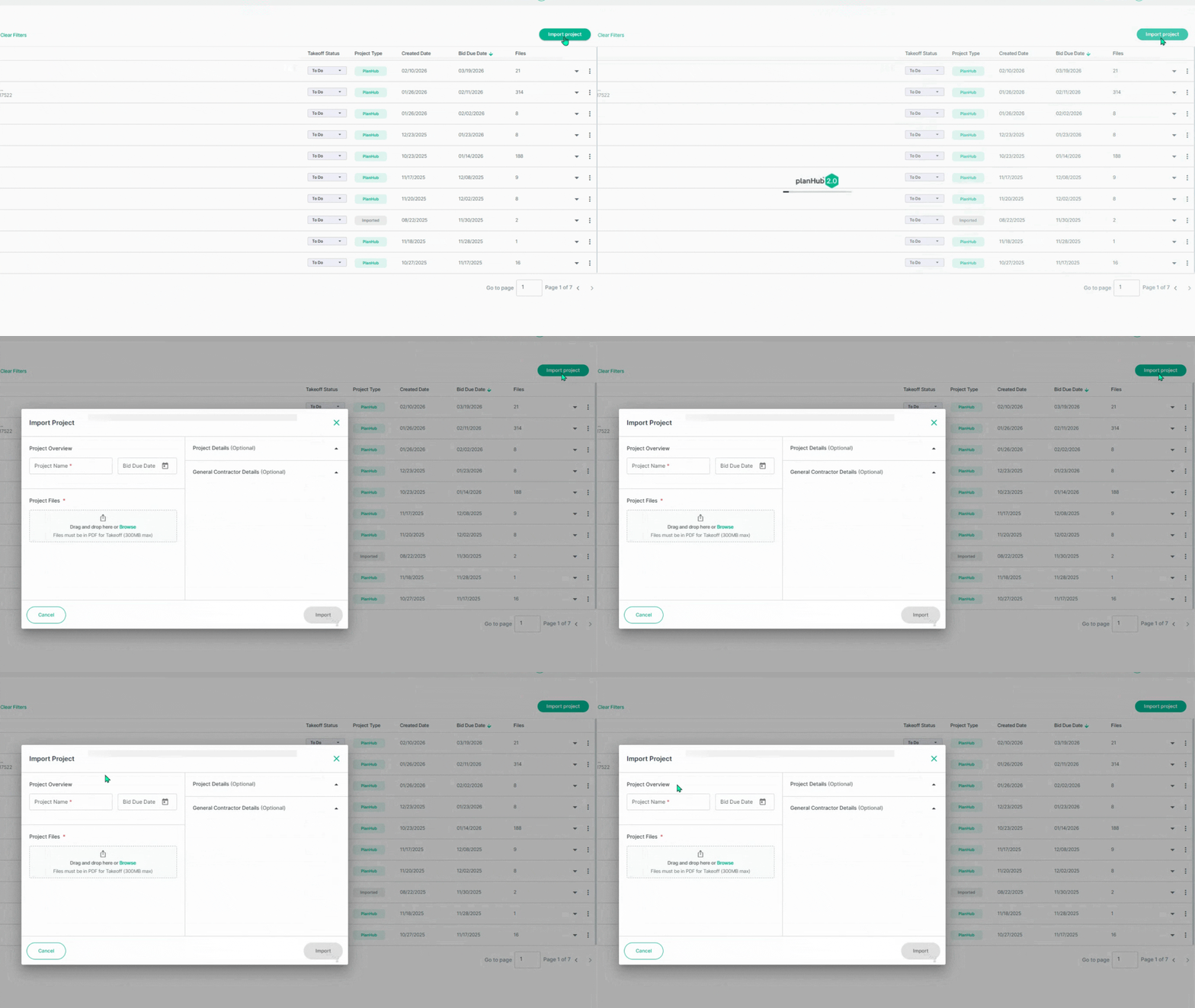
To import a project, click the **Import Project** button in the upper right corner. Fill out the project name, bid due date, and upload PDF files. Next, add project and general contractor details, then click on **Import** to import the project.
**Step 7: Open and Work within a Project**
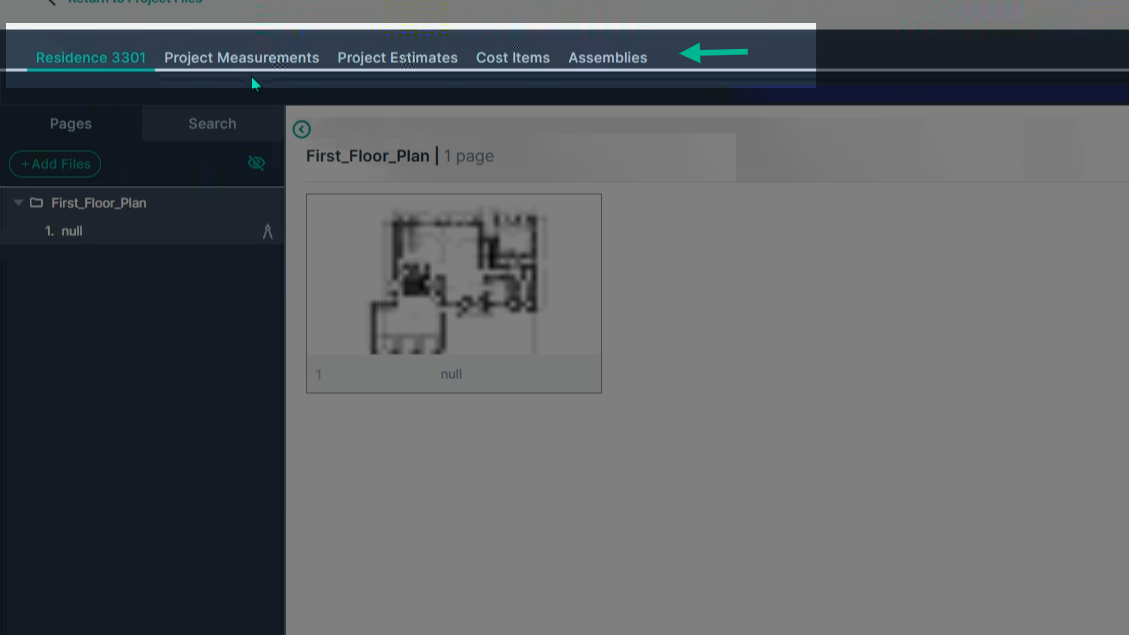
Select a project to view in Takeoff by clicking on the name to enter its takeoff page. The top tabs allows you to switch between the project plans, project measurements list, project estimates, cost items, and assemblies.
**Step 8: Navigate Your Takeoff Workspace**
- On the left: View and name your **Plan Sheets**.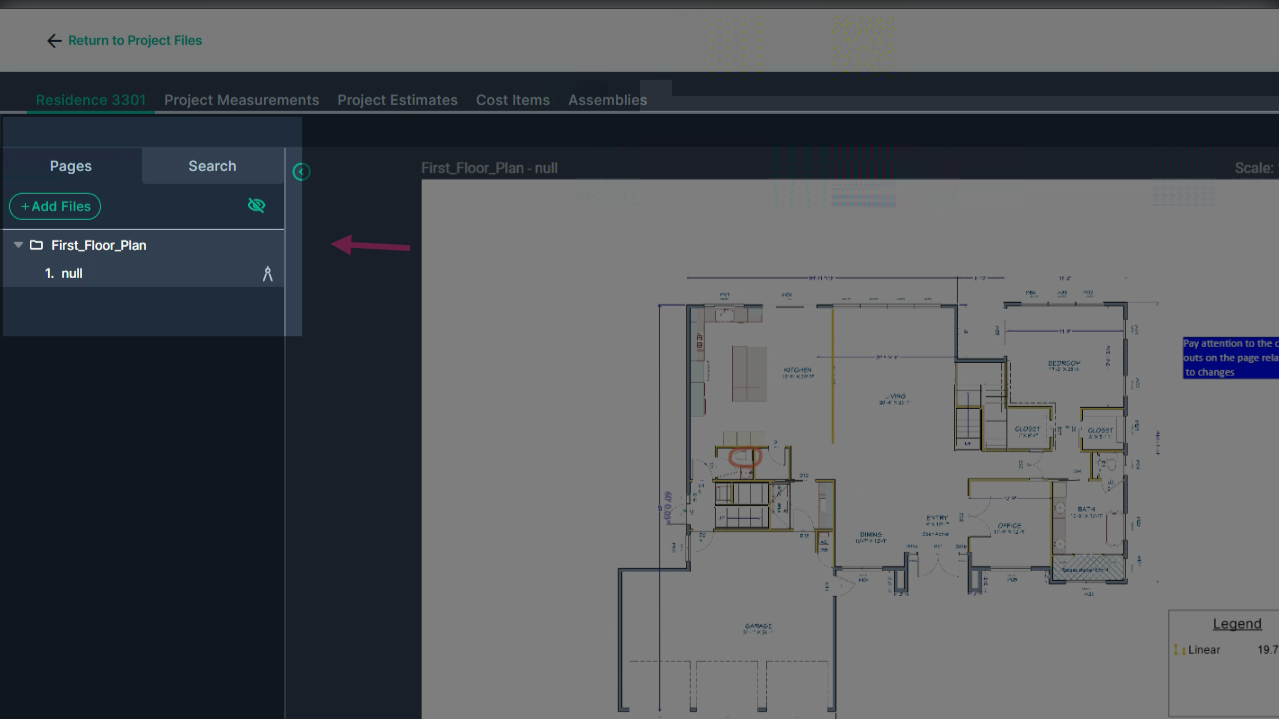
- Center: Examine the currently selected plan sheet to begin your measurements.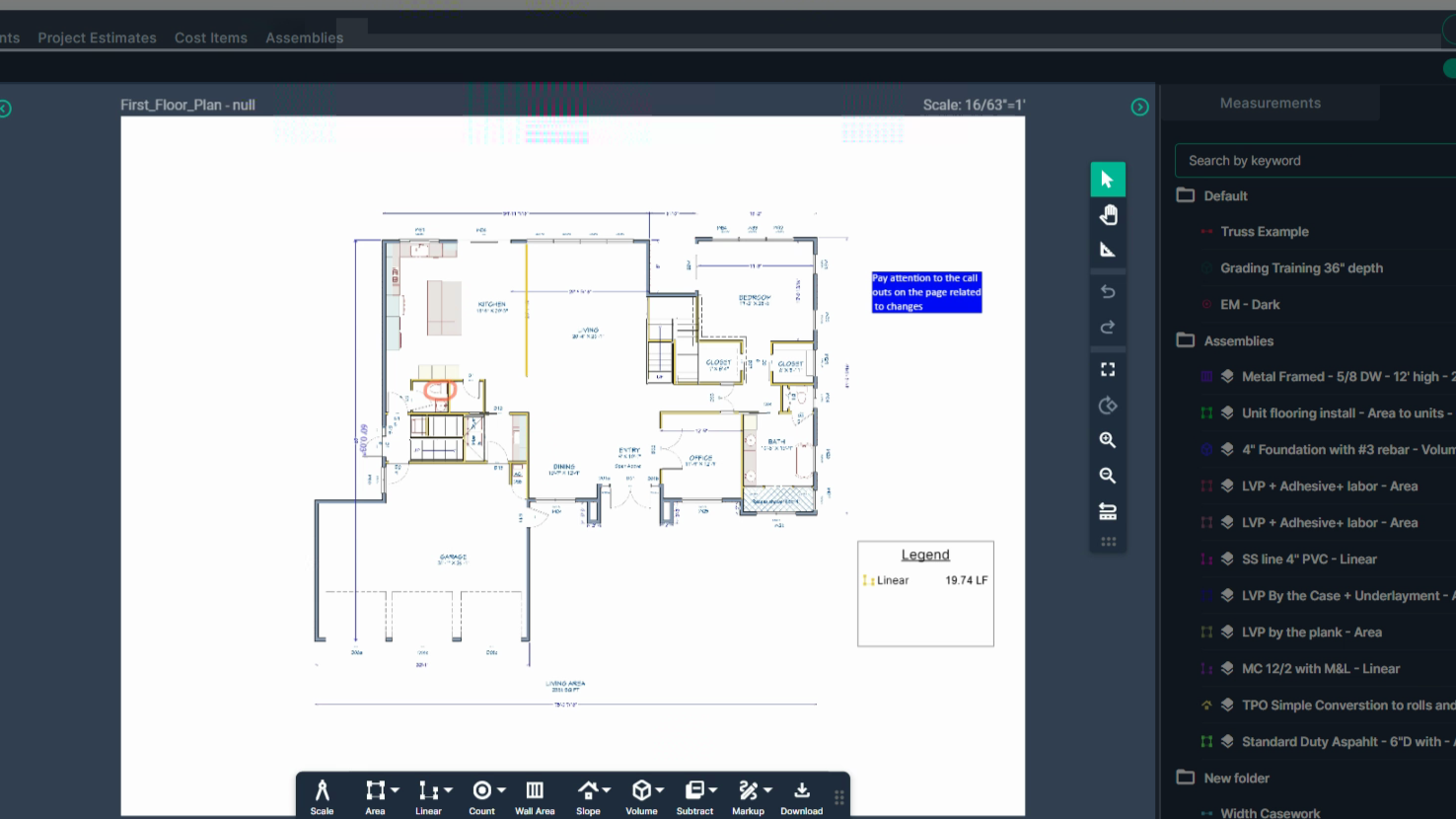
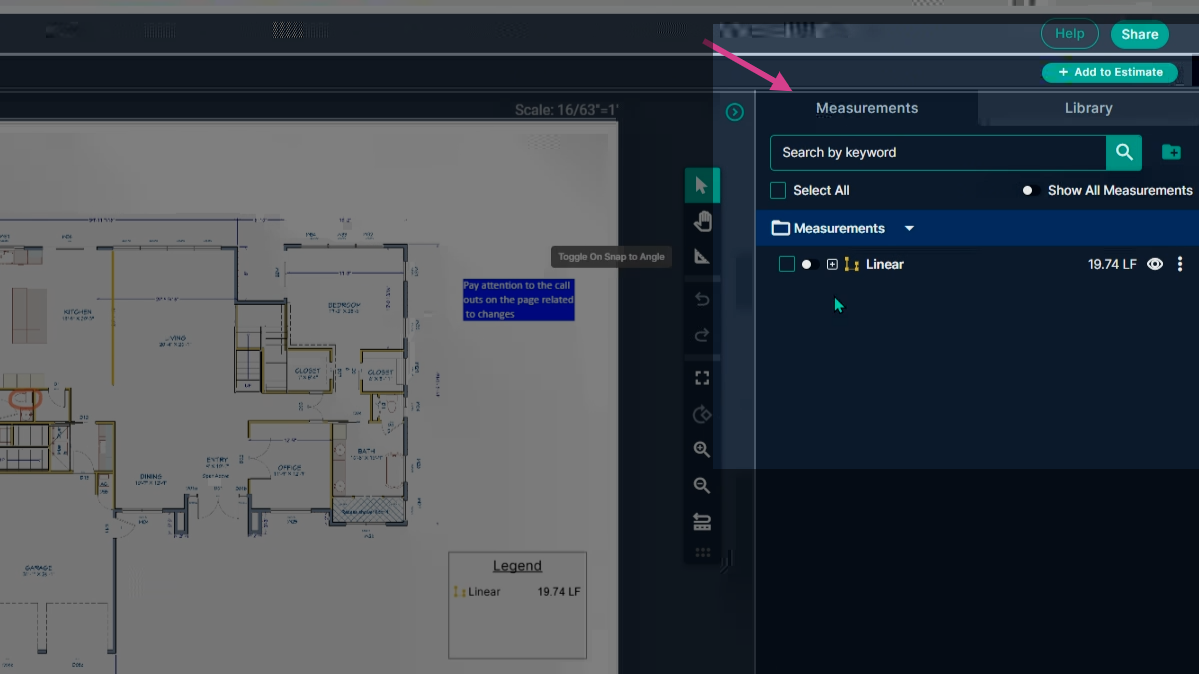
- Right: Access the **Measurements** panel showing your recorded measurements.
**Step 9: Organize Measurements with the Library**
In the measurements panel, create folders using the folder-plus icon. Right-click folders to rename or move measurements into them—organize your work for quick reference and reuse.
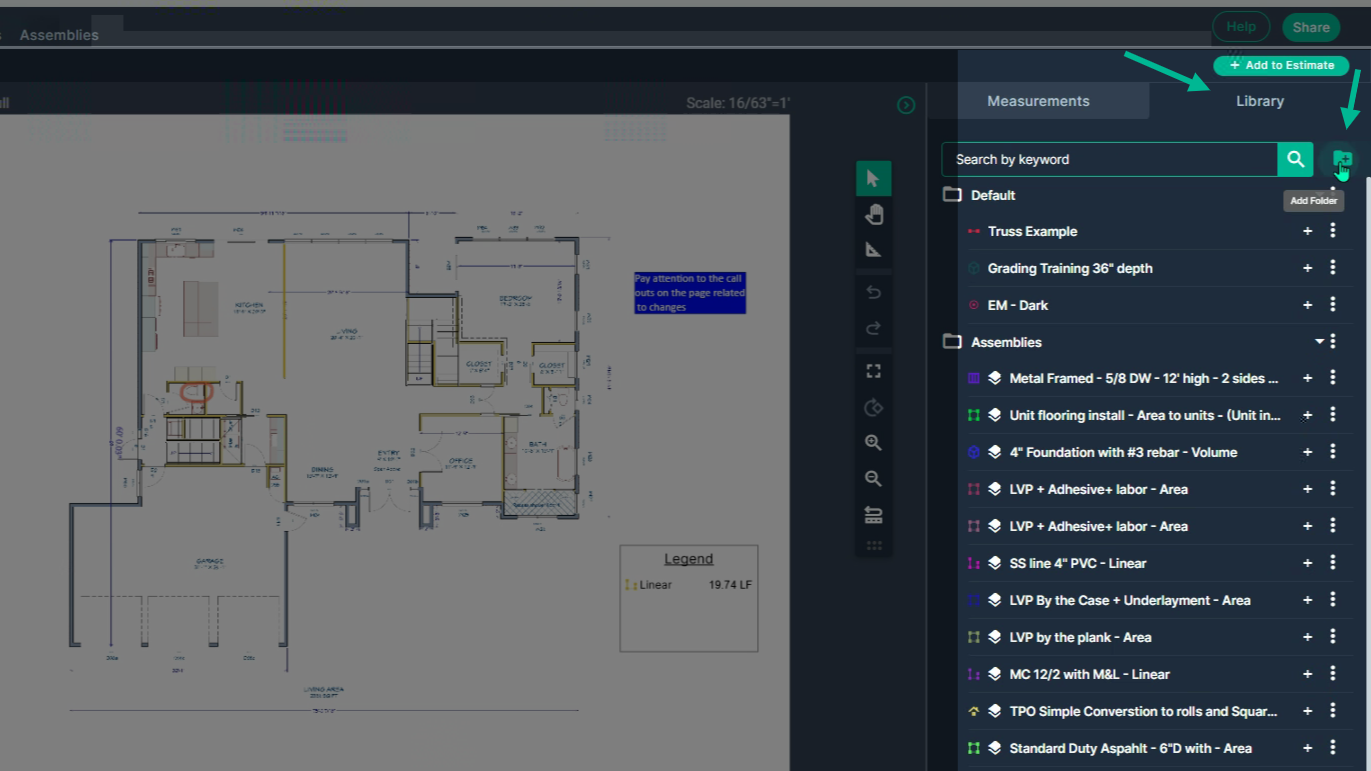
**Step 10: Collapse and Expand Panels as Needed**
Click the green arrow on either side to collapse or expand the **Plan sheet** and **Measurements** panels. Click the green arrows to reopen side panels and lock them in place. Enter full screen from the center toolbar, and exit using the **Escape key** or from the **X** that appears when moving the cursor to the top of the screen.
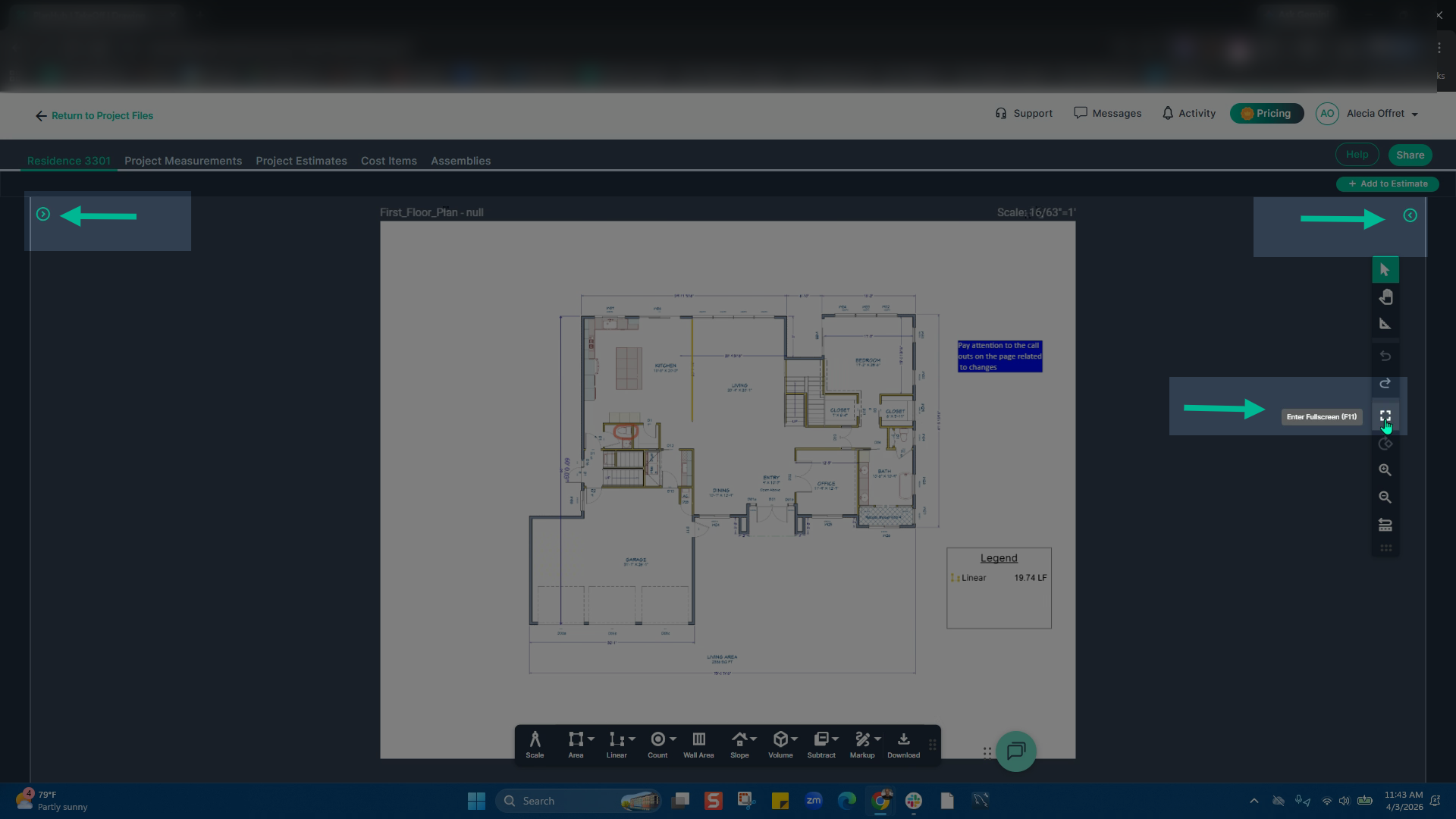
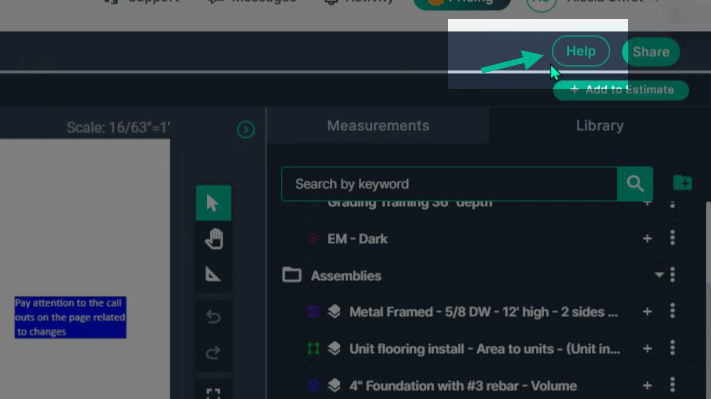
**Step 11: Help Button**
If you have questions about Takeoff, click the **Help** button in the top-right corner for assistance.
By using PlanHub’s Takeoff tools, you can efficiently organize projects, track statuses, and access files all in one place, helping your team stay aligned and productive.
For additional assistance with navigating Takeoff, schedule your one on one Takeoff training by clicking [HERE](https://meetings.hubspot.com/zac-low/takeoff-and-estimation?uuid=67a0a867-48a0-4ff6-a712-1864a3433727).
**Next Steps**
Once you have completed taking all your measurements, you can:
- Download the measurements in a table from the Project Measurements page
- [**How To Download Project Measurements From Takeoff**](https://knowledgebase.planhub.com/knowledge/how-to-download-project-measurements-from-takeoff-?hsLang=en)Add a legend and download the PNG of your takeoff page
- [**Using Legend Markup in Takeoff**](https://knowledgebase.planhub.com/knowledge/legend-markup-in-takeoff?hsLang=en)If you have purchased the Estimation add-on tool, send measurements into the Project Estimate page or push them into an Assembly you have built.
- [**Estimation - Exporting a Measurement from TakeOff to Estimation**](https://knowledgebase.planhub.com/knowledge/send-a-measurement-from-takeoff-to-estimation?hsLang=en)
- [**Estimation | How to Create an Assembly**](https://knowledgebase.planhub.com/knowledge/estimation-how-to-create-an-assembly?hsLang=en)
- Share your Takeoff with anyone using the Share button in the upper right-hand corner.
- [**Share Your Projects, Reports, and Estimates in Takeoff**](https://knowledgebase.planhub.com/knowledge/share-takeoff-projects?hsLang=en)
---
### **Troubleshooting**
Contact us if you need assistance or to report an issue:
- PlanHub Contact Page: [https://planhub.com/contact/](https://planhub.com/contact/)
- Customer Facing Support Ticket Link: [https://knowledgebase.planhub.com/knowledge/kb-tickets/new](https://knowledgebase.planhub.com/knowledge/kb-tickets/new?hsLang=en)
- Schedule a **Free** 1-on-1 Takeoff Training: [https://meetings.hubspot.com/zac-low/takeoff-and-estimation](https://meetings.hubspot.com/zac-low/takeoff-and-estimation?__hstc=143611818.21027487ab2569aa780deedad7b3e510.1767116760760.1778608051685.1778612775772.256&__hssc=143611818.3.1778612775772&__hsfp=9a20deea0f29d5f2adc379a49644adc2)
- [New General Contractor Experience](https://knowledgebase.planhub.com/knowledge/new-general-contractor-experience?hsLang=en#main-content)
- [Overview](https://knowledgebase.planhub.com/knowledge/new-general-contractor-experience?hsLang=en#overview)
- [Projects](https://knowledgebase.planhub.com/knowledge/new-general-contractor-experience?hsLang=en#projects)
- [Networking](https://knowledgebase.planhub.com/knowledge/new-general-contractor-experience?hsLang=en#networking)
- [Takeoff & Estimation](https://knowledgebase.planhub.com/knowledge/new-general-contractor-experience?hsLang=en#takeoff-estimation)
- [Account & Settings](https://knowledgebase.planhub.com/knowledge/new-general-contractor-experience?hsLang=en#account-settings)
- [Manage Your Team](https://knowledgebase.planhub.com/knowledge/new-general-contractor-experience?hsLang=en#manage-your-team)
- [AI Tools](https://knowledgebase.planhub.com/knowledge/new-general-contractor-experience?hsLang=en#ai-tools)
- [Subcontractors](https://knowledgebase.planhub.com/knowledge/subcontractors?hsLang=en#main-content)
- [Overview](https://knowledgebase.planhub.com/knowledge/subcontractors?hsLang=en#overview)
- [Projects](https://knowledgebase.planhub.com/knowledge/subcontractors?hsLang=en#projects)
- [Bid Board & Tracking](https://knowledgebase.planhub.com/knowledge/subcontractors?hsLang=en#bid-board-tracking)
- [Networking](https://knowledgebase.planhub.com/knowledge/subcontractors?hsLang=en#networking)
- [Takeoff & Estimation](https://knowledgebase.planhub.com/knowledge/subcontractors?hsLang=en#takeoff-estimation)
- [Manage Your Team](https://knowledgebase.planhub.com/knowledge/subcontractors?hsLang=en#manage-your-team)
- [Account & Settings](https://knowledgebase.planhub.com/knowledge/subcontractors?hsLang=en#account-settings)
- [Job Board](https://knowledgebase.planhub.com/knowledge/subcontractors?hsLang=en#job-board)
- [AI](https://knowledgebase.planhub.com/knowledge/subcontractors?hsLang=en#ai)
- [Supplier](https://knowledgebase.planhub.com/knowledge/supplier?hsLang=en#main-content)
- [Overview](https://knowledgebase.planhub.com/knowledge/supplier?hsLang=en#overview)
- [Projects and Leads](https://knowledgebase.planhub.com/knowledge/supplier?hsLang=en#projects-and-leads)
- [Bidding & Estimating](https://knowledgebase.planhub.com/knowledge/supplier?hsLang=en#bidding-estimating)
- [Networking](https://knowledgebase.planhub.com/knowledge/supplier?hsLang=en#networking)
- [Account & Settings](https://knowledgebase.planhub.com/knowledge/supplier?hsLang=en#account-settings)
- [Takeoff & Estimation](https://knowledgebase.planhub.com/knowledge/takeoff-estimation?hsLang=en#main-content)
- [Getting Started](https://knowledgebase.planhub.com/knowledge/takeoff-estimation?hsLang=en#getting-started)
- [Takeoff Tools & Measurements](https://knowledgebase.planhub.com/knowledge/takeoff-estimation?hsLang=en#takeoff-tools-measurements)
- [Trade-Specific Takeoffs](https://knowledgebase.planhub.com/knowledge/takeoff-estimation?hsLang=en#trade-specific-takeoffs)
- [Estimating](https://knowledgebase.planhub.com/knowledge/takeoff-estimation?hsLang=en#estimating)
- [Managing & Sharing Your Work](https://knowledgebase.planhub.com/knowledge/takeoff-estimation?hsLang=en#managing-sharing-your-work)
- [Account & Billing](https://knowledgebase.planhub.com/knowledge/account-billing?hsLang=en#main-content)
- [Account & Billing](https://knowledgebase.planhub.com/knowledge/account-billing?hsLang=en#account-billing)
- [Account Closure](https://knowledgebase.planhub.com/knowledge/account-billing?hsLang=en#account-closure)
- [Troubleshooting](https://knowledgebase.planhub.com/knowledge/troubleshooting?hsLang=en)
- [About PlanHub](https://knowledgebase.planhub.com/knowledge/about-planhub?hsLang=en)
- [General Contractor](https://knowledgebase.planhub.com/knowledge/general-contractor?hsLang=en#main-content)
- [Overview](https://knowledgebase.planhub.com/knowledge/general-contractor?hsLang=en#overview)
- [Projects](https://knowledgebase.planhub.com/knowledge/general-contractor?hsLang=en#projects)
- [Networking](https://knowledgebase.planhub.com/knowledge/general-contractor?hsLang=en#networking)
- [Archived](https://knowledgebase.planhub.com/knowledge/general-contractor?hsLang=en#archived)
- [Submit Feedback](https://knowledgebase.planhub.com/knowledge/submit-feedback?hsLang=en#main-content)
- [Feedback](https://knowledgebase.planhub.com/knowledge/submit-feedback?hsLang=en#feedback)
- [API](https://knowledgebase.planhub.com/knowledge/api?hsLang=en)
- [Construction Education](https://knowledgebase.planhub.com/knowledge/construction-education?hsLang=en#main-content)
- [Contractor Roles and Responsibilities](https://knowledgebase.planhub.com/knowledge/construction-education?hsLang=en#contractor-roles-and-responsibilities)
- [Have an Issue? Submit a Ticket](https://knowledgebase.planhub.com/knowledge/kb-tickets/new)
[](https://planhub.com/)
[Knowledge Base Home](https://knowledgebase.planhub.com/knowledge?hsLang=en)
[Submit a Ticket](https://knowledgebase.planhub.com/knowledge/kb-tickets/new?hsLang=en)
Copyright © 2026, ©2026 PlanHub, Inc. All rights reserved