---
title: PlanHub Network Page Guide
description: In this detailed article, you will learn how to navigate your Network page and manage your Connections.
---
[Skip to content](https://knowledgebase.planhub.com/knowledge/planhubs-network-page-guide#main-content)
English
Show submenu for translations
[Submit a Ticket](https://knowledgebase.planhub.com/knowledge/kb-tickets/new?hsLang=en)
![NEW\_PlanHub\_Logo\_Navy.png\]](https://knowledgebase.planhub.com/hs-fs/hubfs/Design/PH%20Logos/NEW%202024%20PH%20Logos/NEW_PlanHub_Logo_Navy.png?height=40&name=NEW_PlanHub_Logo_Navy.png)
- [Have an Issue? Submit a Ticket](https://knowledgebase.planhub.com/knowledge/kb-tickets/new)
Open main navigation
Close main navigation
- [Have an Issue? Submit a Ticket](https://knowledgebase.planhub.com/knowledge/kb-tickets/new)
- English
Show submenu for translations
- [Submit a Ticket](https://knowledgebase.planhub.com/knowledge/kb-tickets/new)
What can we help you with?
- There are no suggestions because the search field is empty.
1. [Knowledge Base](https://knowledgebase.planhub.com/knowledge?hsLang=en)
2. [Subcontractors](https://knowledgebase.planhub.com/knowledge/subcontractors?hsLang=en)
3. [Networking](https://knowledgebase.planhub.com/knowledge/subcontractors?hsLang=en#networking)
# PlanHub Network Page Guide
## Looking to boost your connections and win more bids? The PlanHub Network Directory add-on helps subcontractors find, expand, and strengthen relationships with general contractors all in one place. Here’s how to navigate and use the Network Directory effectively.
### Getting Started: Accessing the Network Page
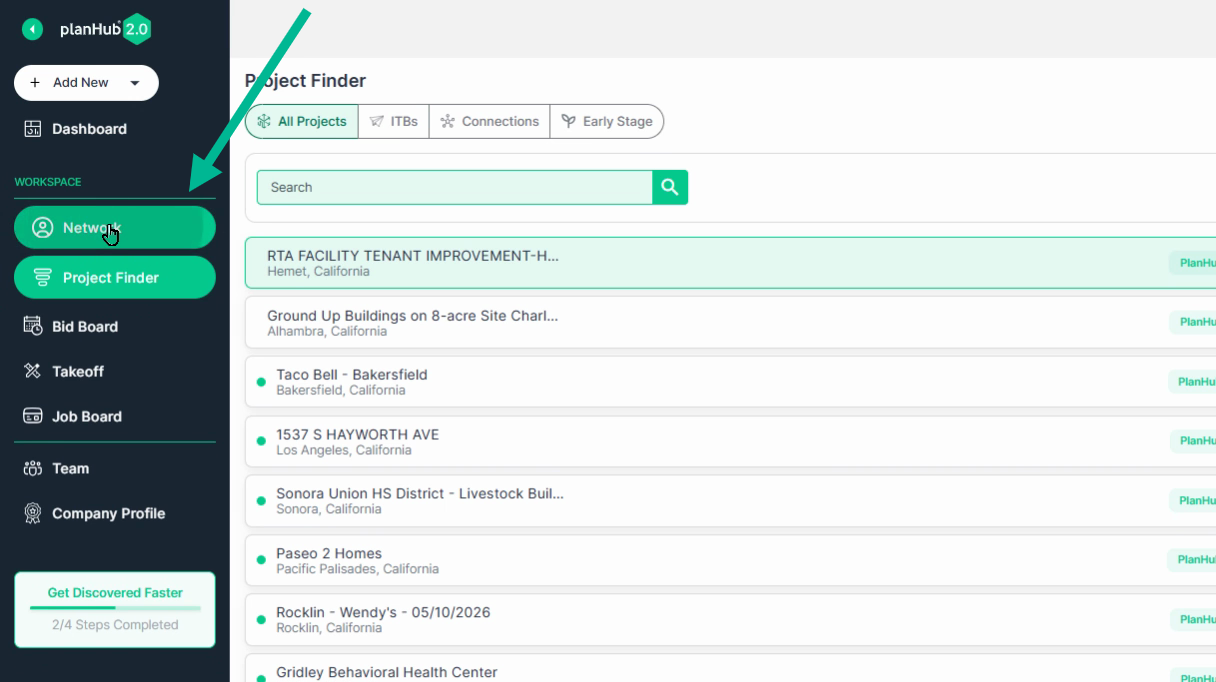
Step 1: Log in to your PlanHub account and open the **Network** page.
---
### Exploring the Network Directory
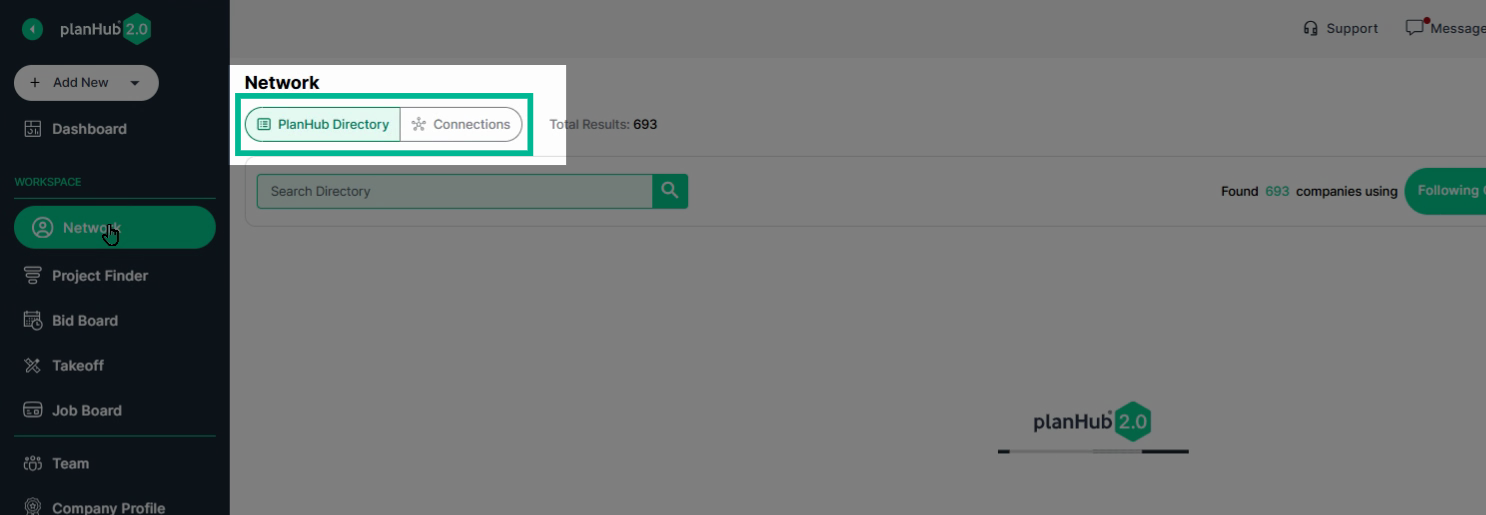
Step 1: At the top of the page, notice two tabs: **PlanHub Directory** and **Connections**.
- Start with the **PlanHub Directory**.
Step 2: Search and Filter
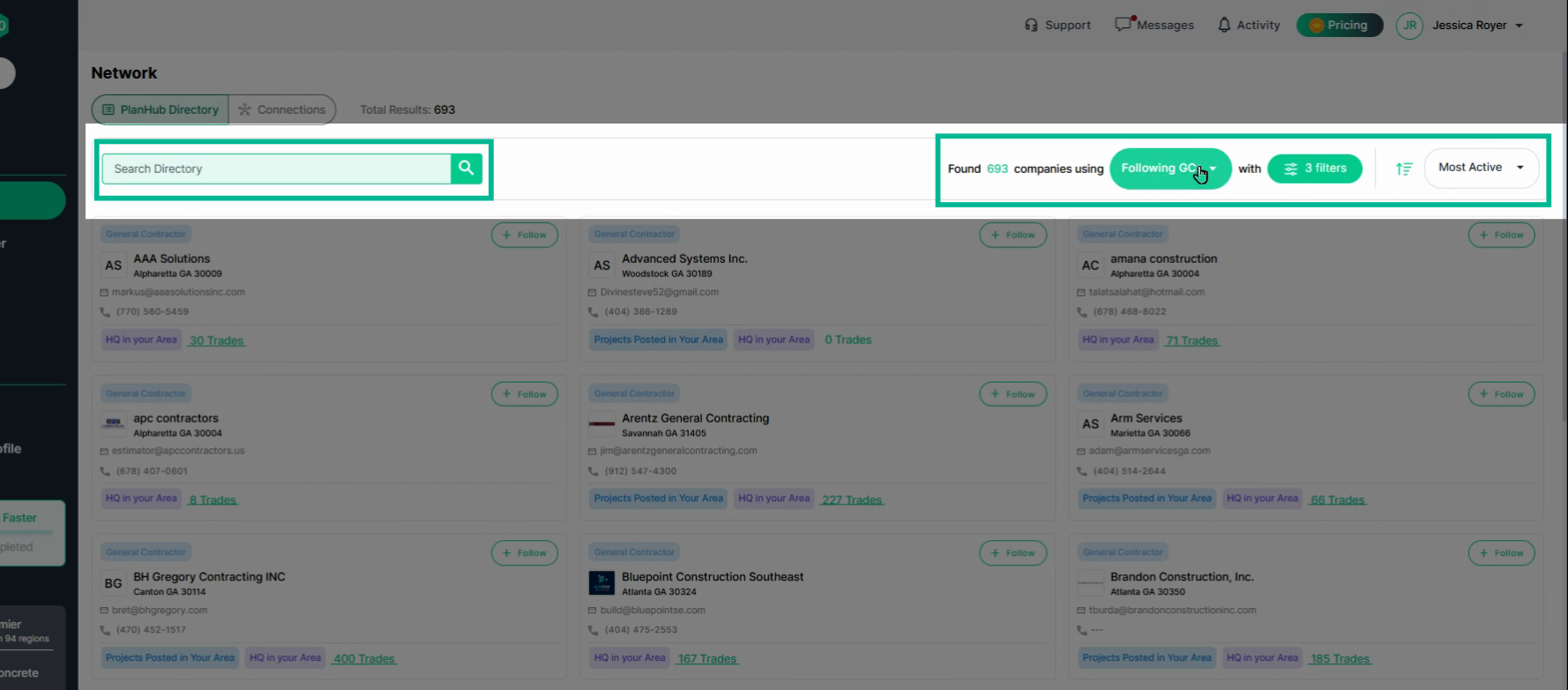
- Use the **Search bar** to look up companies or contacts by name.
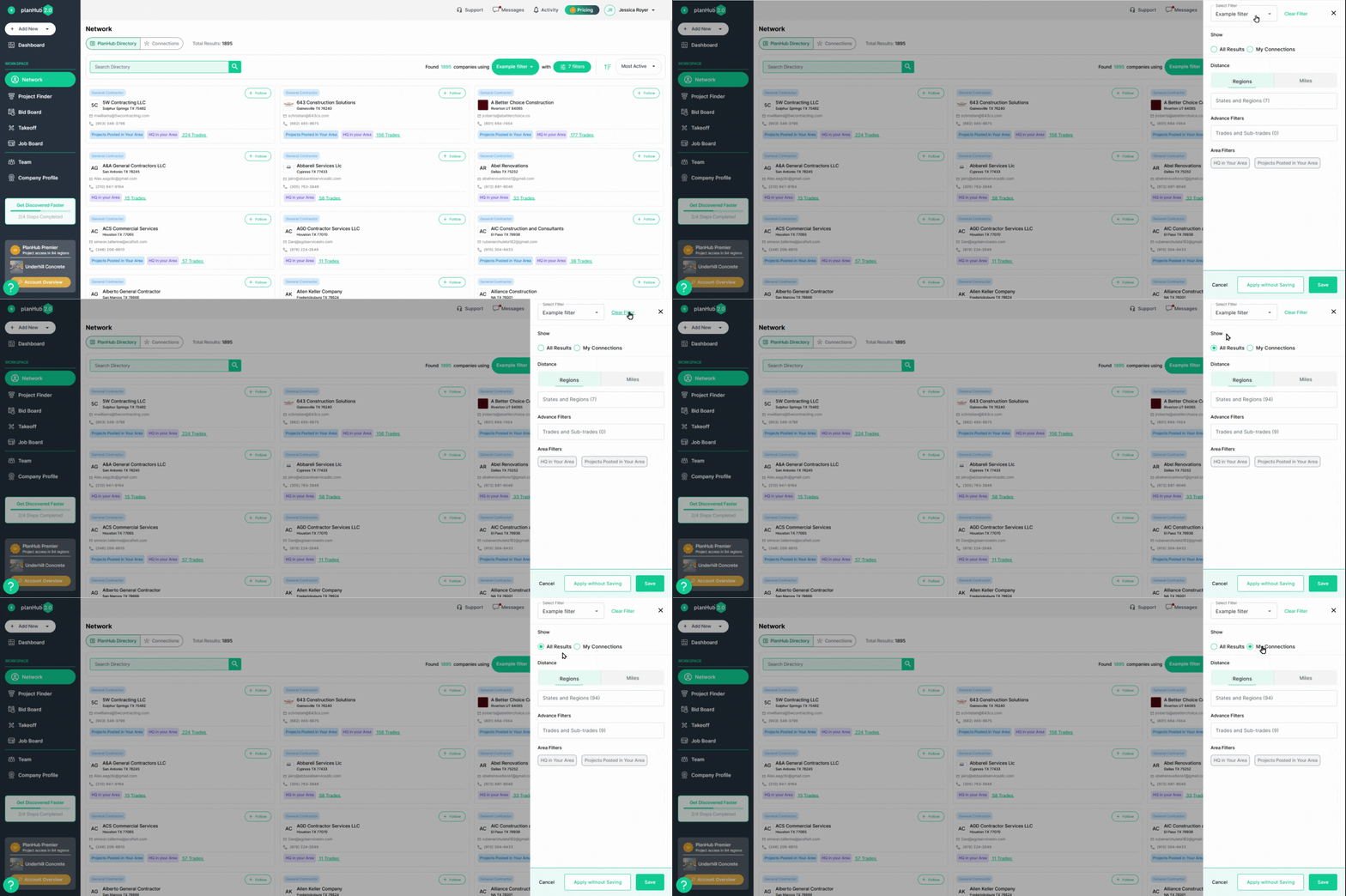
- Apply **Filters** to narrow your results by company details. You can create and save filters for faster searches in the future.
Step 3: Open the **Saved Filters** dropdown to select a saved filter set.
To edit a filter, click on the **Filters**.
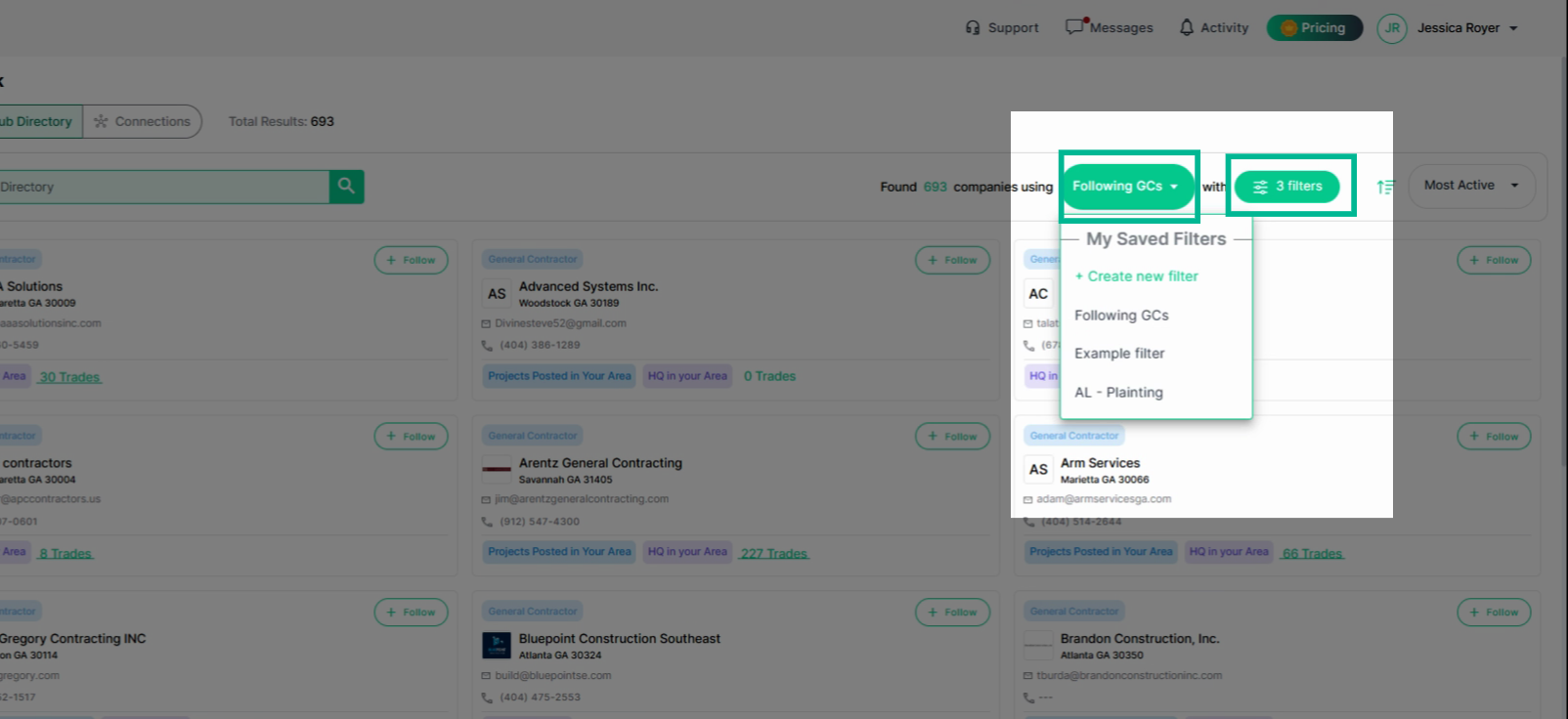
Step 4: Edit filter sets by selecting the **Filters** button, then **Edit Filters**.
- To reset filters, click **Clear Filter** at the top.
- Apply any filters you want and click "**Apply without Saving**" or "**Save**" based on whether you want to save this set of filters.
---
### Sort and Build Your Network
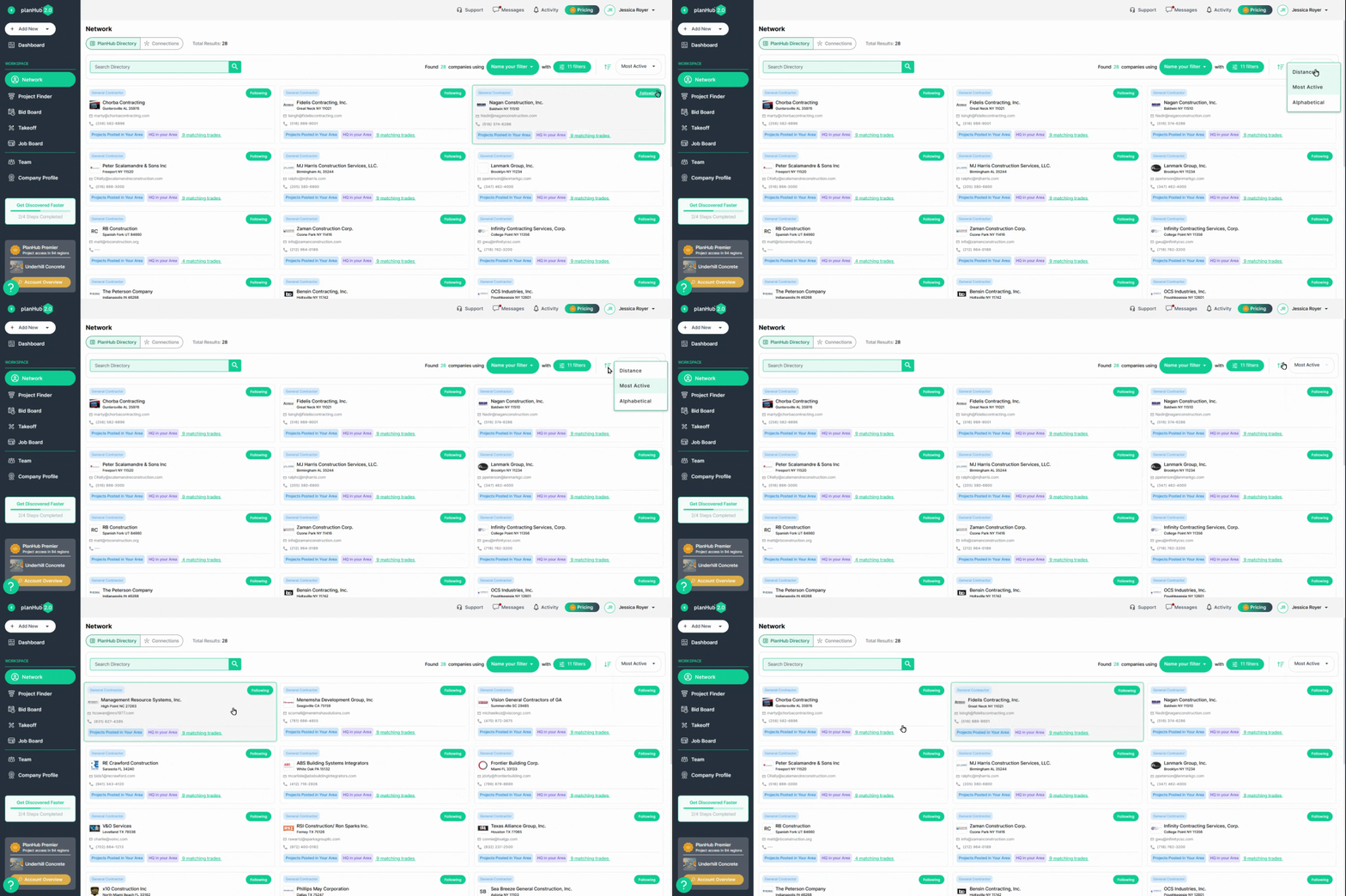
Step 1: Sort results by distance, activity, or alphabetically to fit your needs. Change the sort direction as needed.
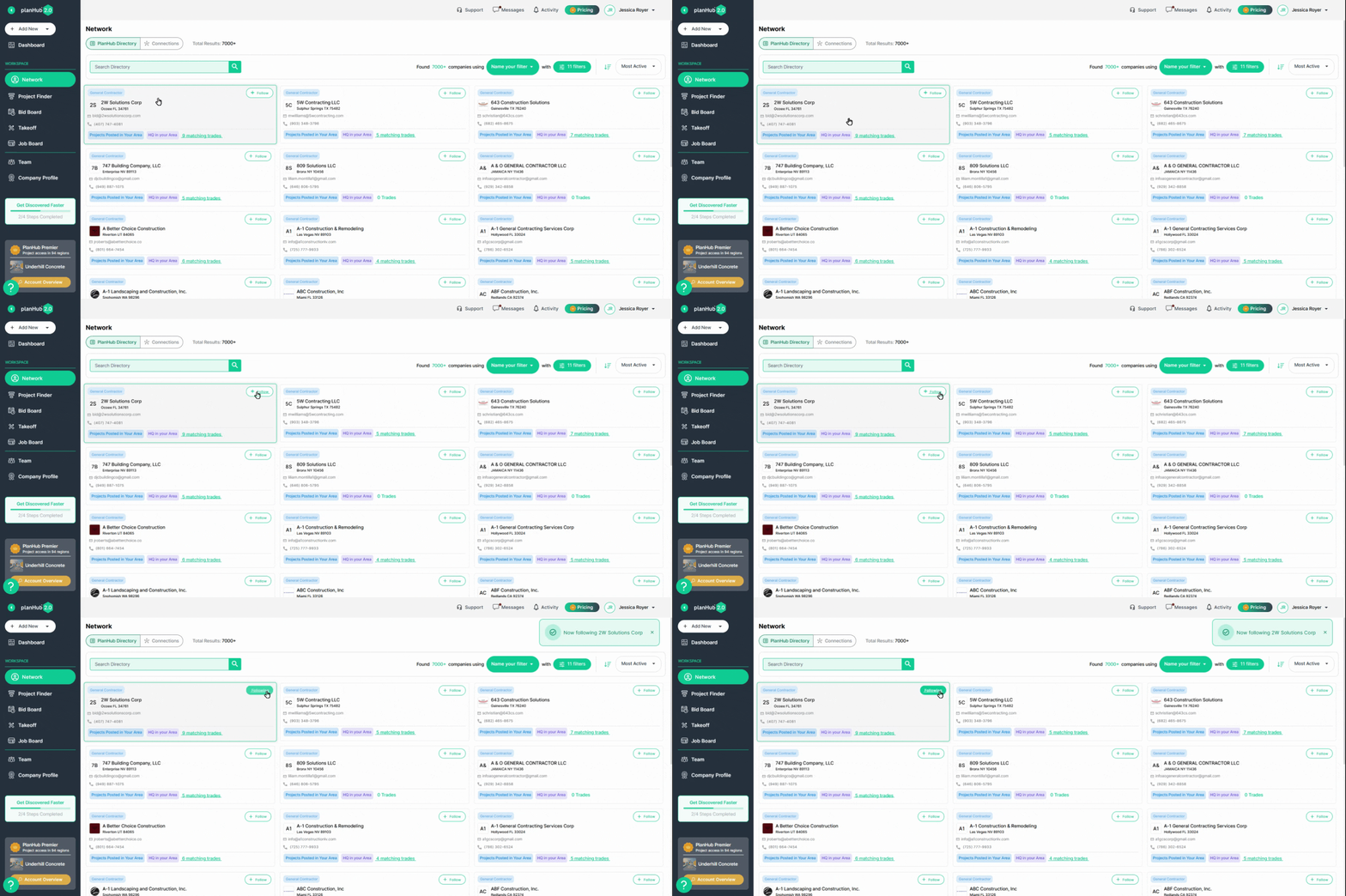
Step 2: To add a GC to your Connections, follow the general contractors in the Directory.
- Go to the company's card and click **Follow**.
- They will appear in your **Connections** tab and are targetable in the Project Finder.
---
### Viewing General Contractor Company Profiles
Step 1: View a general contractor’s profile by clicking their company name.
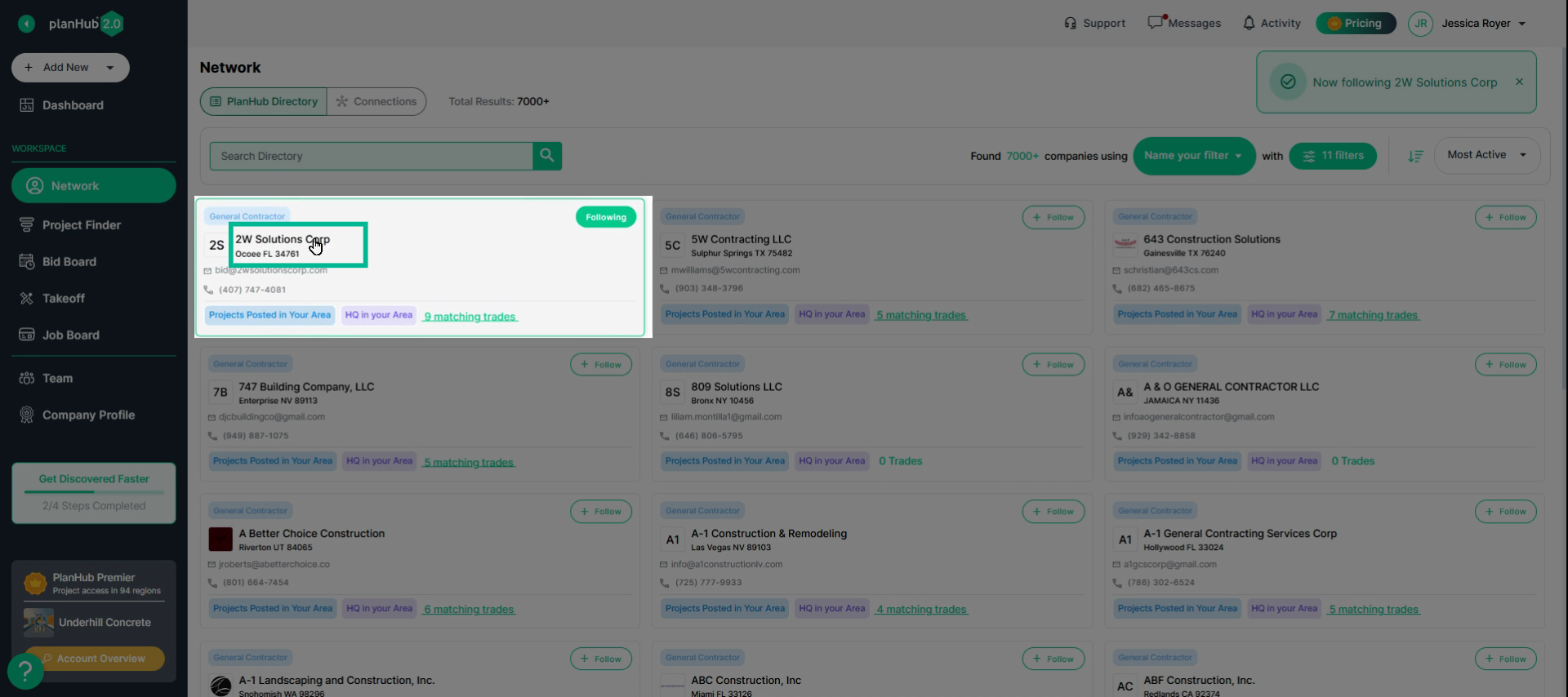
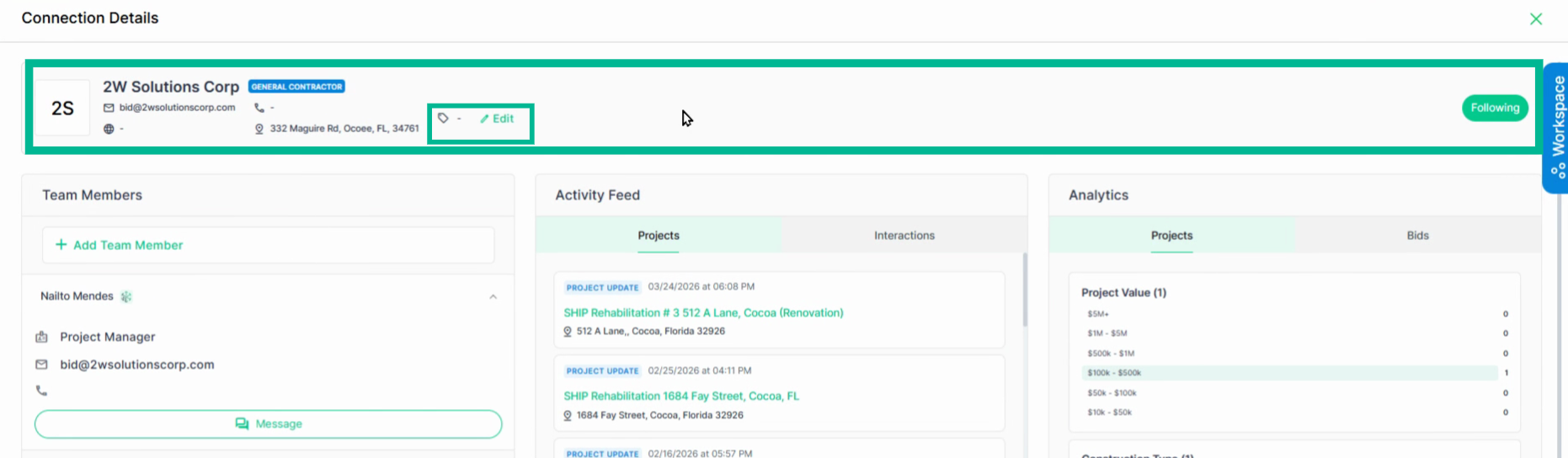
Step 2: In the profile header, find the company and contact details. Along with the "**Tags**" you or your team added, and the ability to add tags.
The **Team Member** section lets you connect with registered users or add team members to the company. 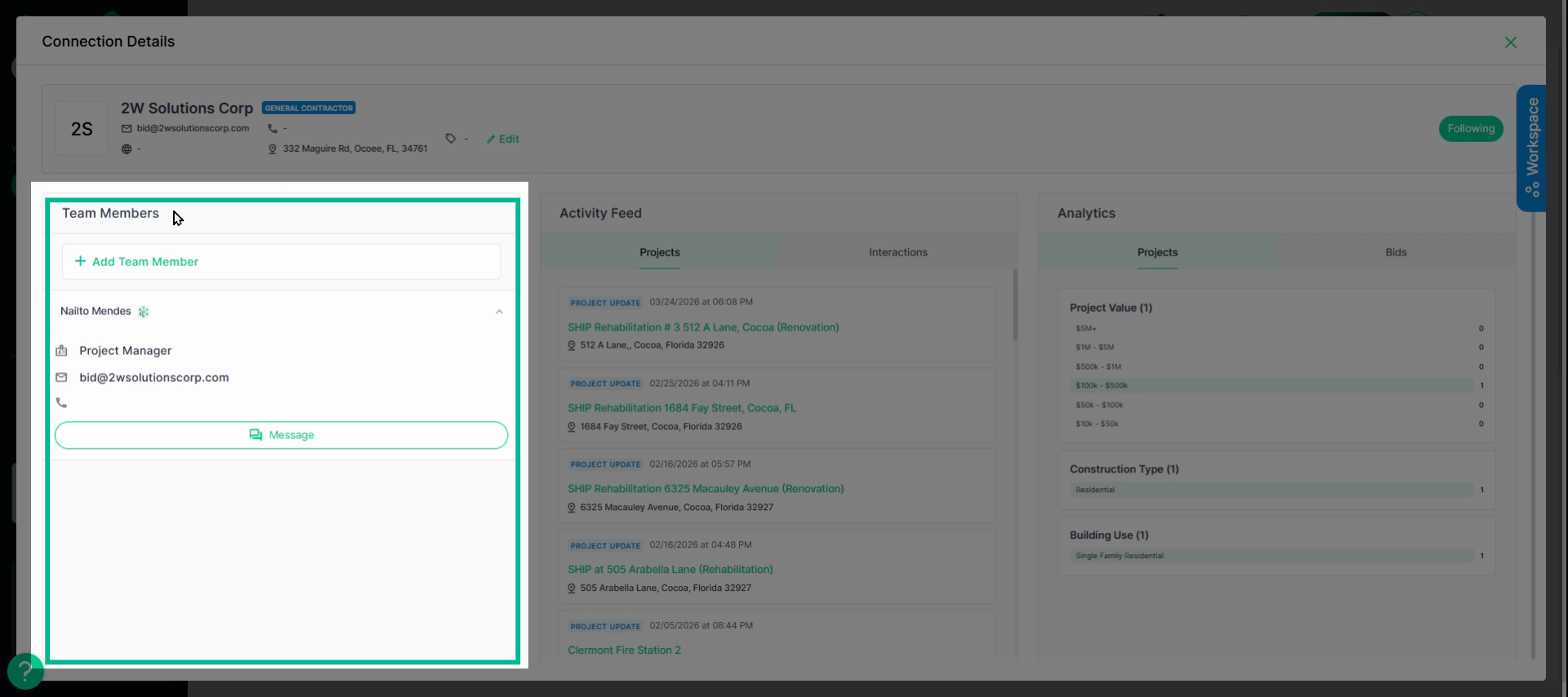
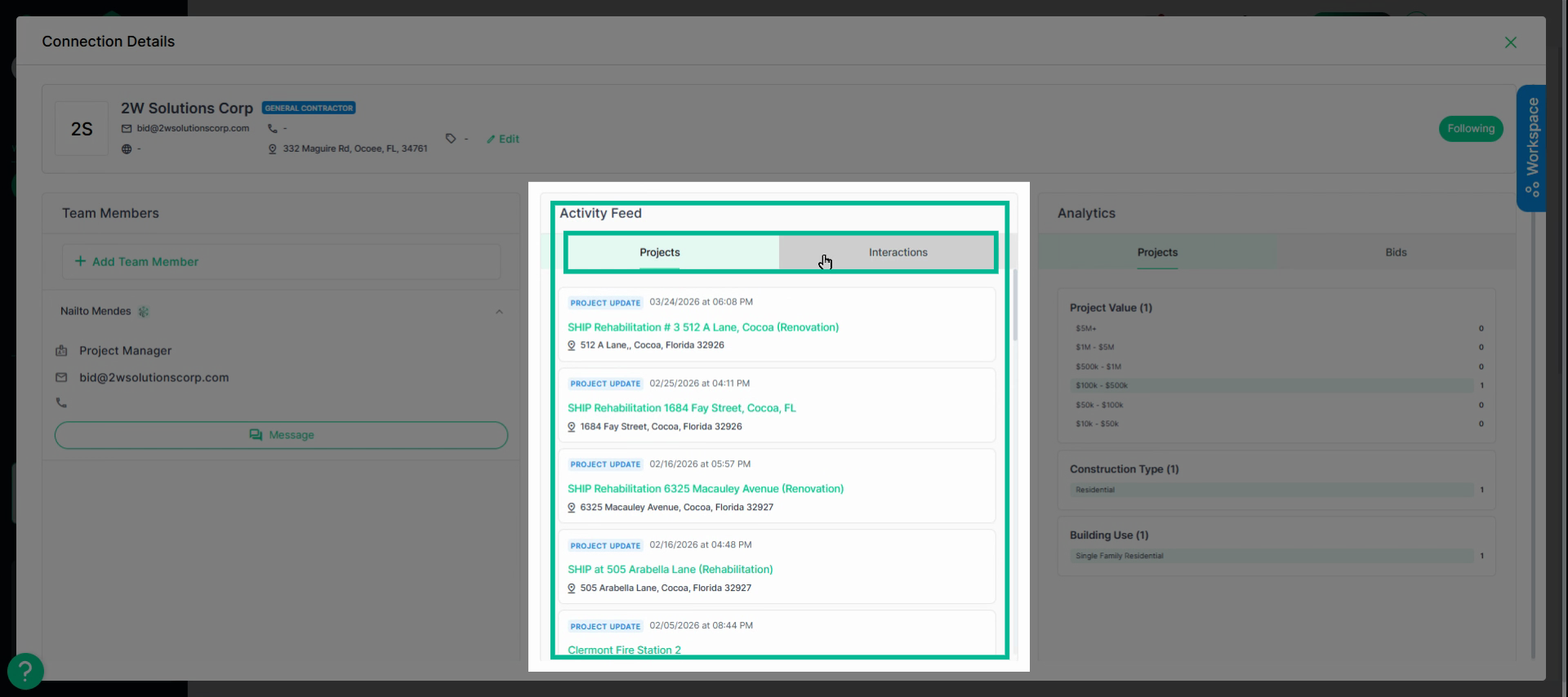
Step 3: The **Activity Feed** includes the Projects tab (all posted projects) and Interactions tab (you and your team's history with them in PlanHub).
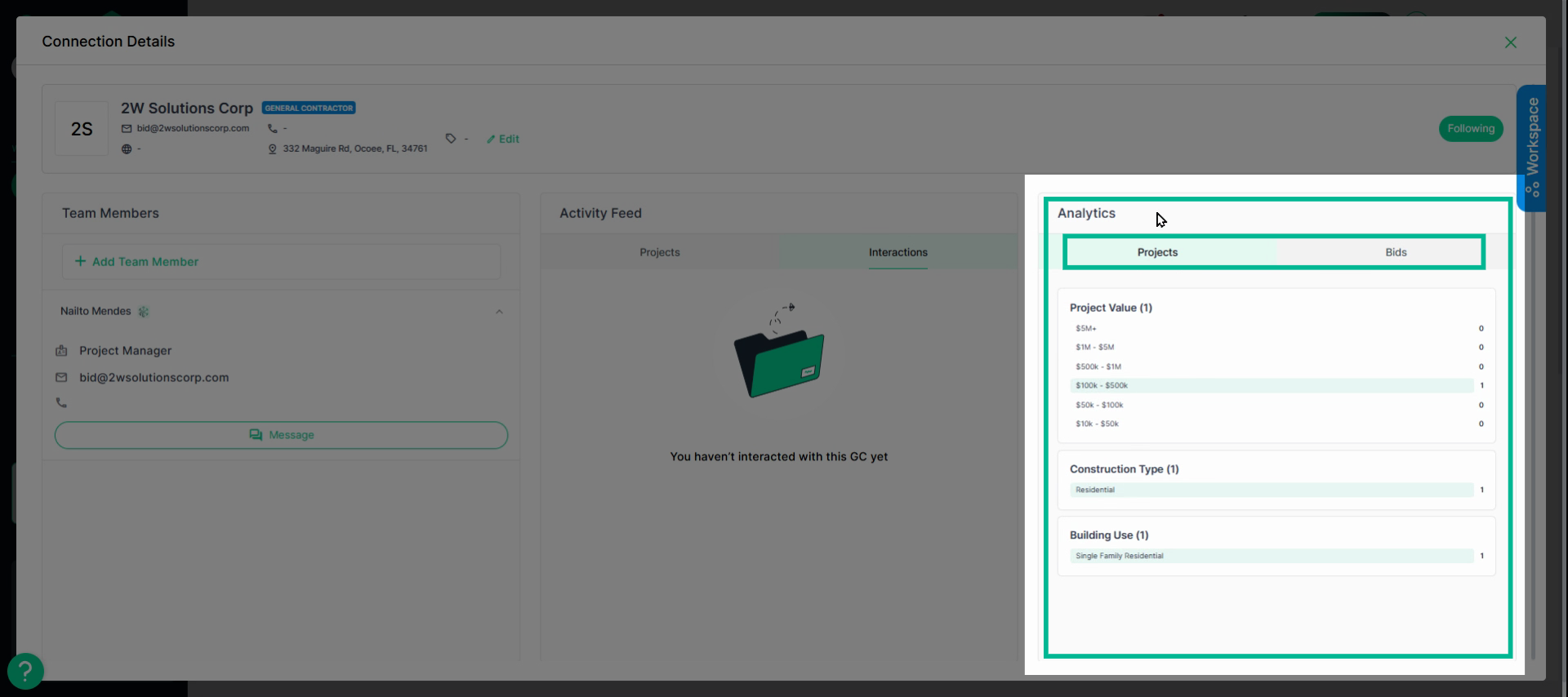
Step 4: The **Analytics** section shows the GC's overall posted **Projects** analytics, by value, construction type, and building use.
- In the **Bids** tab, see your submitted bids, awarded bids, and win rate analytics, plus feedback received from that contractor.
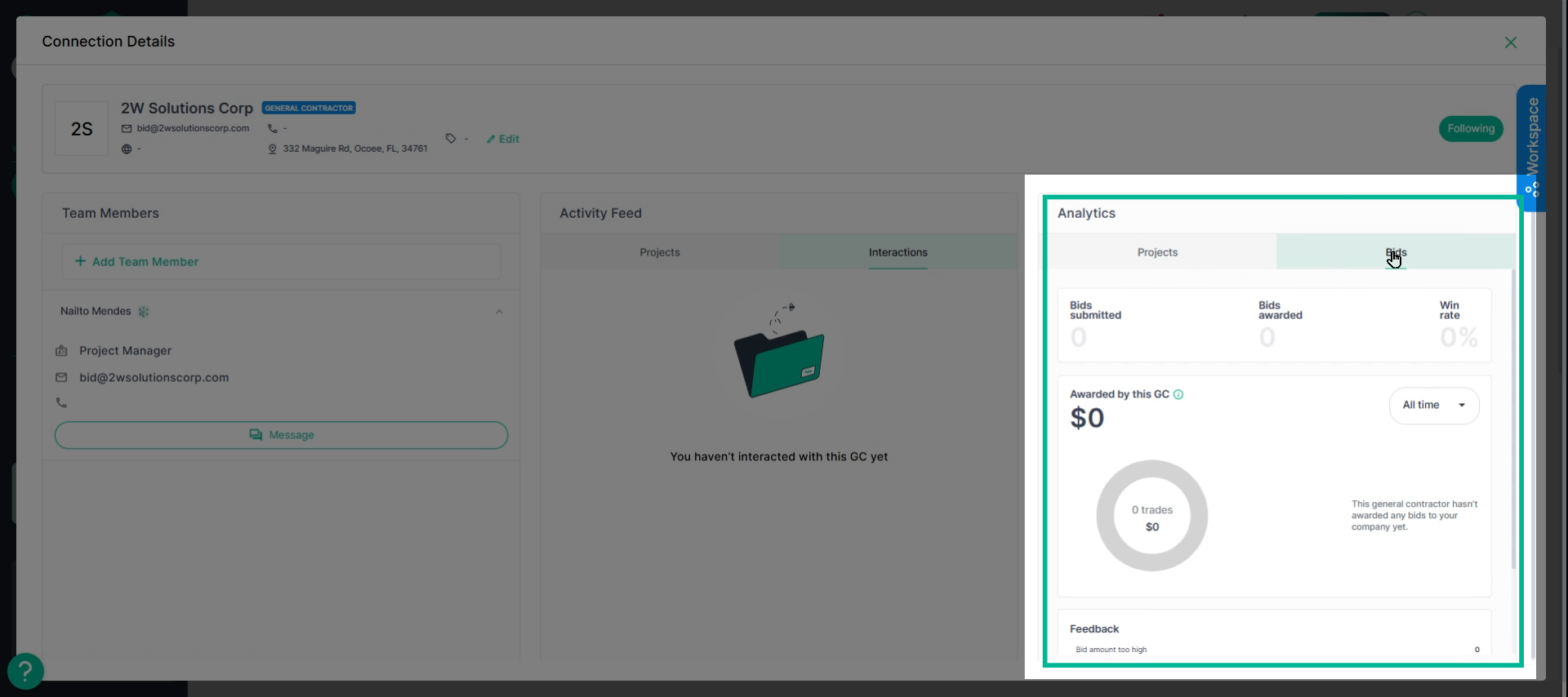
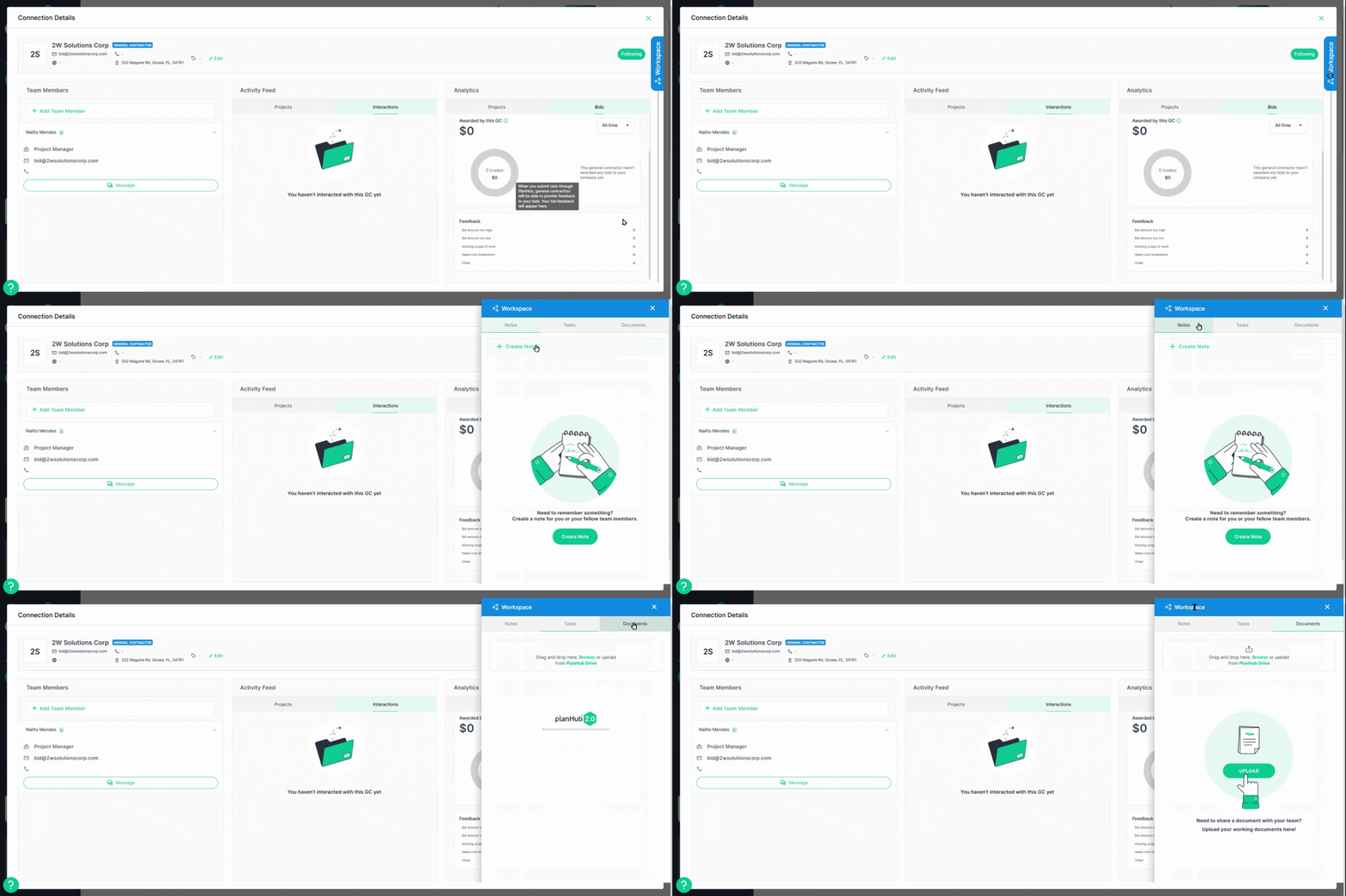
Step 5: Use the private **Workspace** on each General Contractor’s profile for notes, assigning tasks, and attaching documents. Only your users can access this space; it’s perfect for tracking interactions and maintaining company-wide context.
---
### Manage and Filter Connections
Step 1: Switch to the **Connections** tab to see your network in list format.
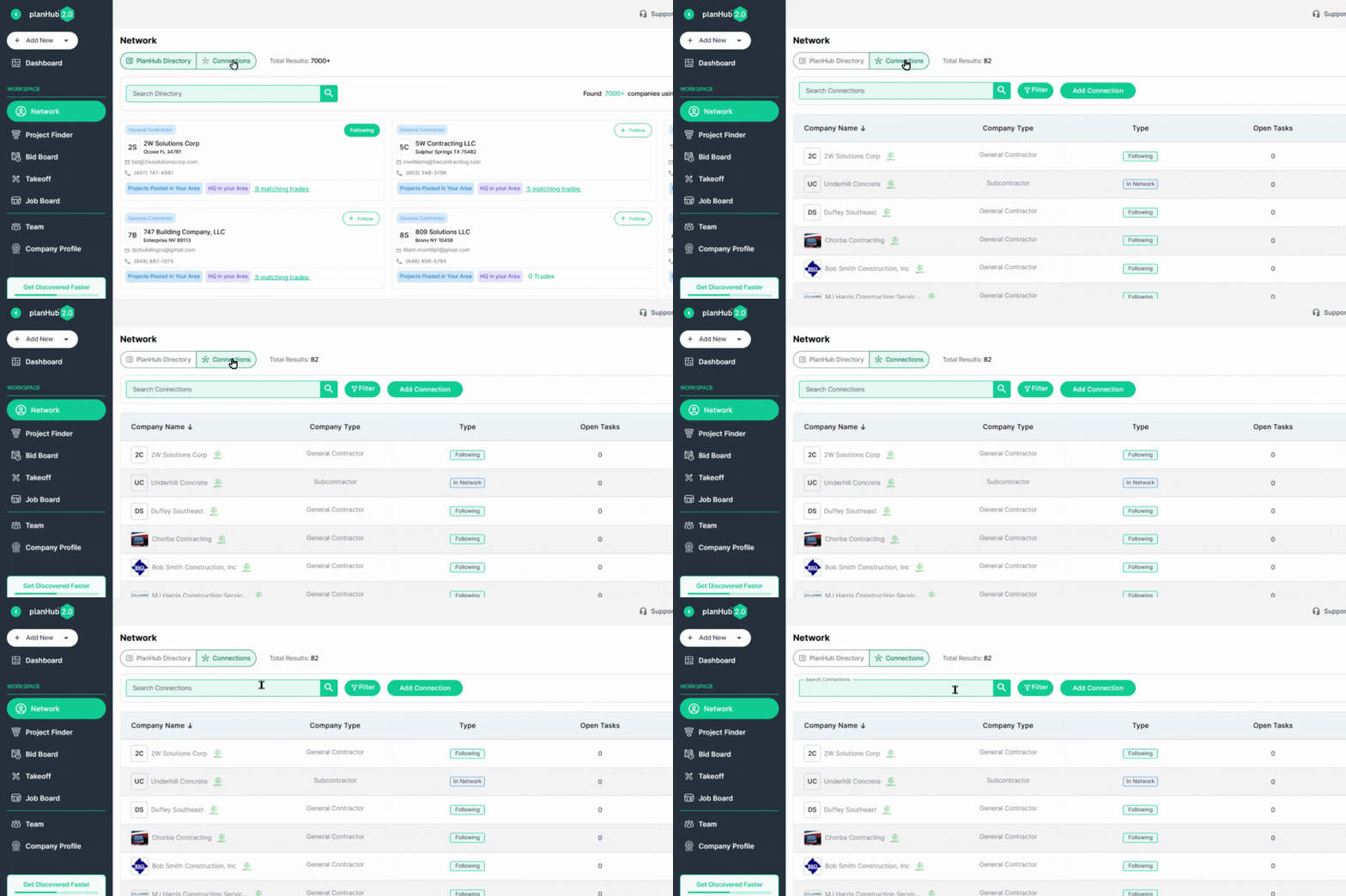
Search and filter by company or contact.
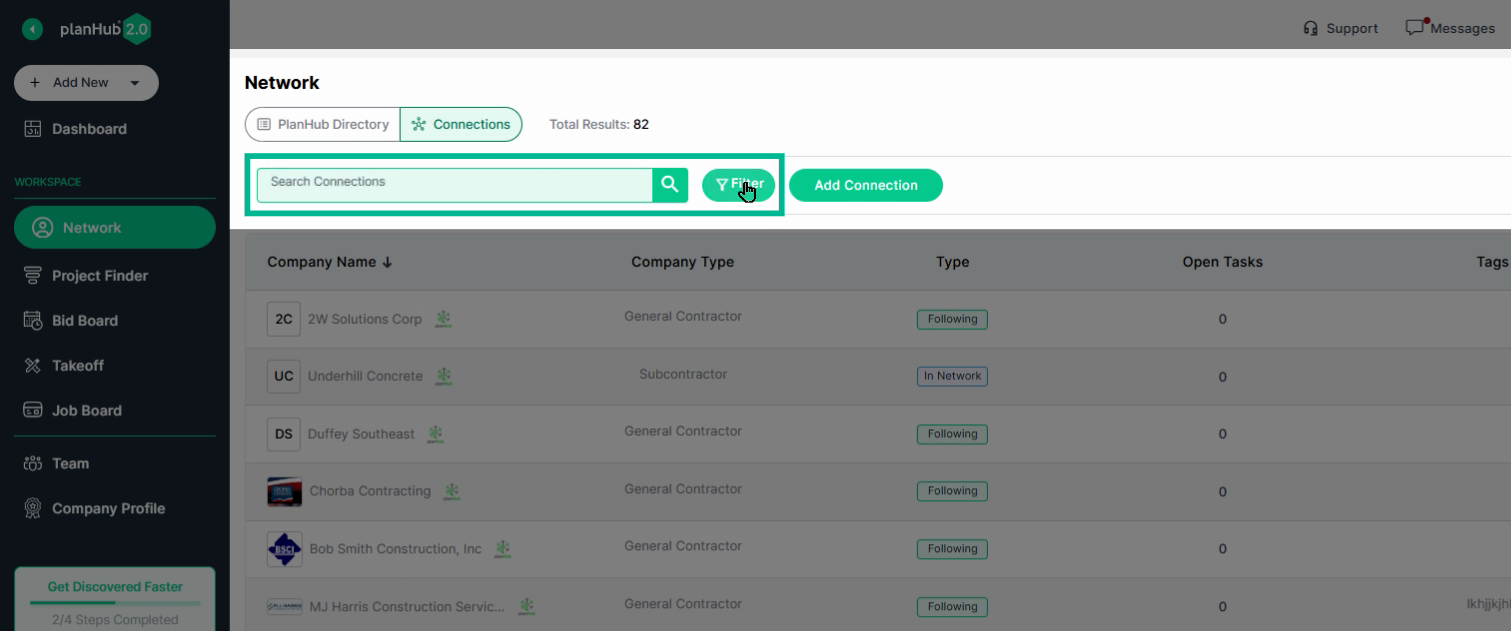
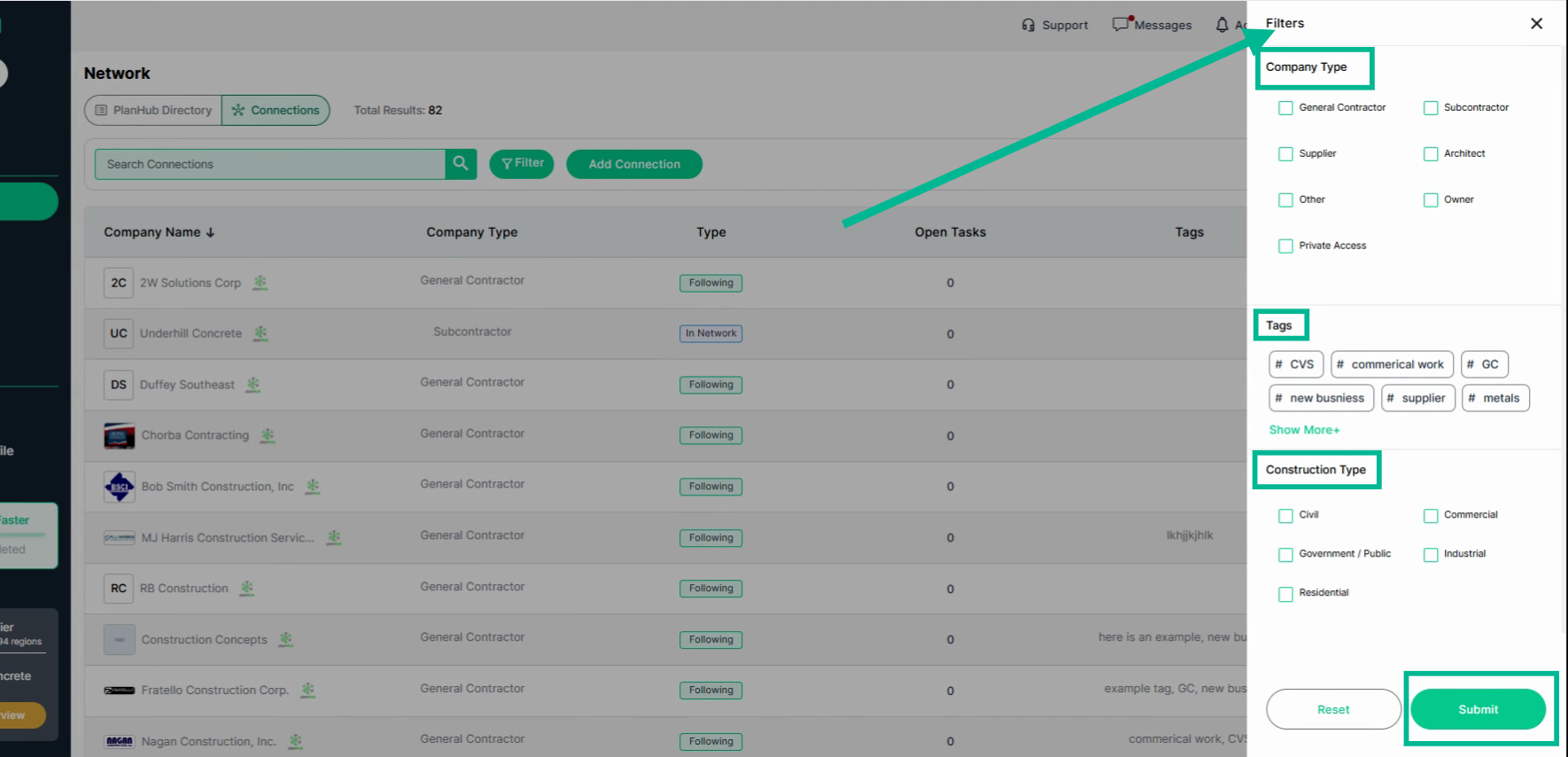
Step 2: Filter by Company Type, Applied Tags, and Connection Type, and click **Submit** to see results.
- *Apply* ***Tags*** *to organize your GC relationships by project type, relationship status, or other helpful details.*
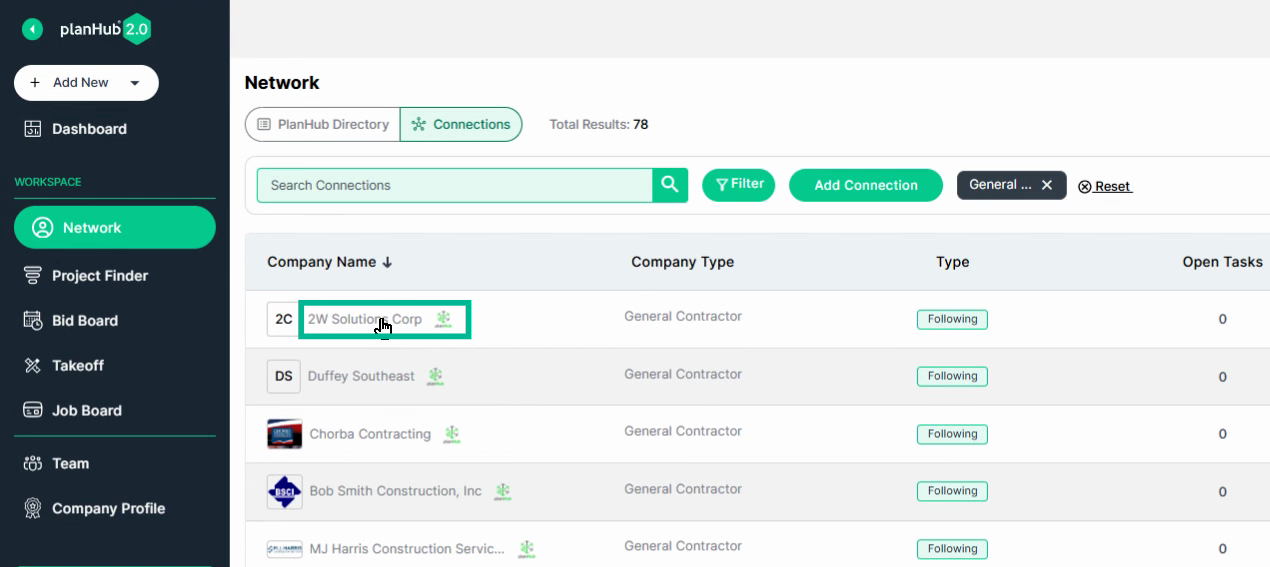
Step 3: To open a GC's company card, click their name.
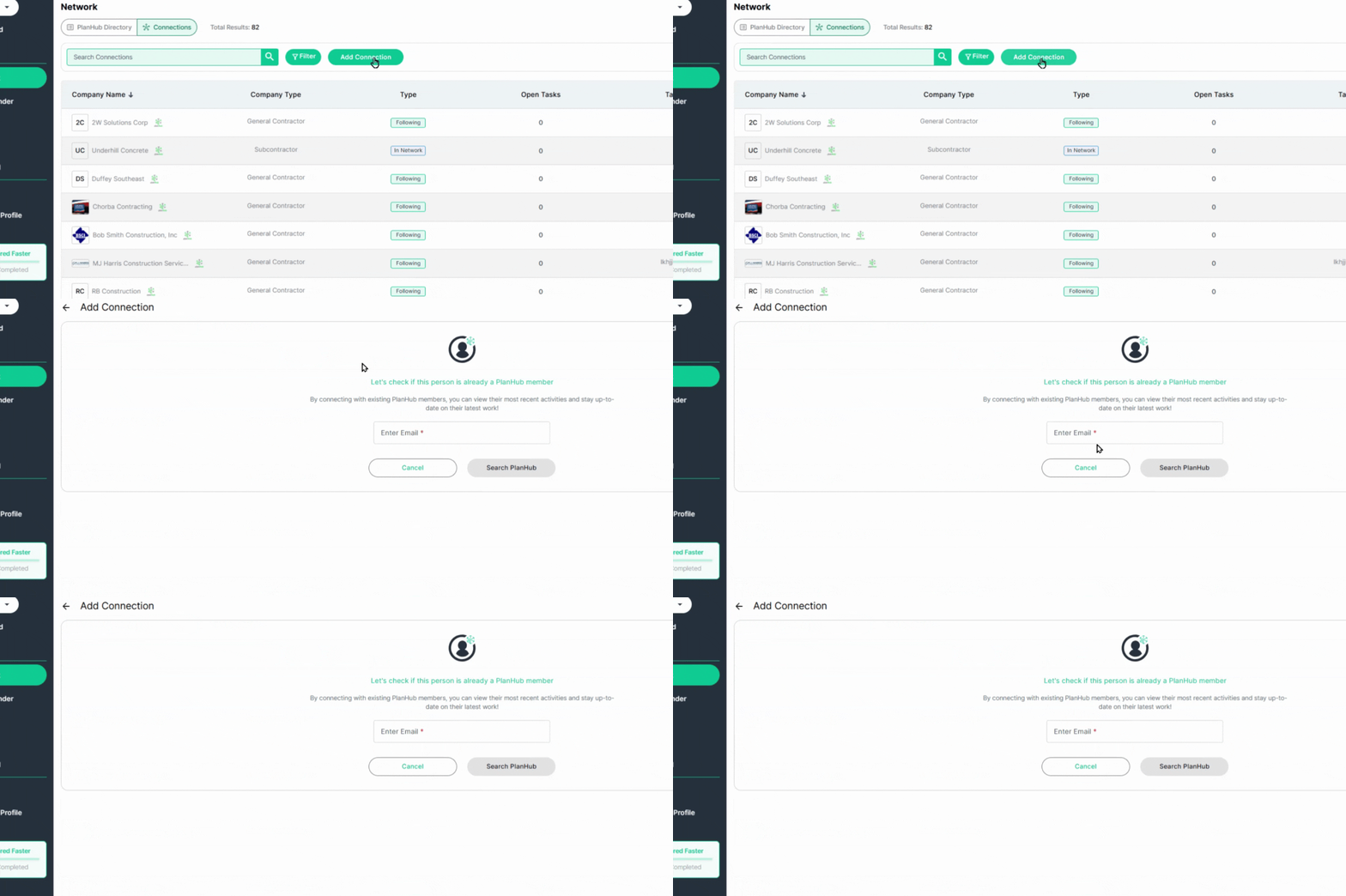
Step 4: Build your directory by adding company connections. Click **Add Connection**, enter the contact's email, and choose **Search PlanHub**. If they’re a user, you’ll connect and see their activity; if not, create a new company profile for them.
---
### Conclusion
PlanHub's Directory and Network Page let you work smarter—track relationships, organize opportunities, and expand your reach with general contractors in one streamlined solution. Start connecting and watch your business grow!
### **Troubleshooting**
Contact us if you need assistance or to report an issue:
- PlanHub Contact Page: [https://planhub.com/contact/](https://planhub.com/contact/)
- Customer Facing Support Ticket Link: [https://knowledgebase.planhub.com/knowledge/kb-tickets/new](https://knowledgebase.planhub.com/knowledge/kb-tickets/new?hsLang=en)
- [General Contractor](https://knowledgebase.planhub.com/knowledge/general-contractor?hsLang=en#main-content)
- [Overview](https://knowledgebase.planhub.com/knowledge/general-contractor?hsLang=en#overview)
- [Projects](https://knowledgebase.planhub.com/knowledge/general-contractor?hsLang=en#projects)
- [Networking](https://knowledgebase.planhub.com/knowledge/general-contractor?hsLang=en#networking)
- [Subcontractors](https://knowledgebase.planhub.com/knowledge/subcontractors?hsLang=en#main-content)
- [Overview](https://knowledgebase.planhub.com/knowledge/subcontractors?hsLang=en#overview)
- [Projects](https://knowledgebase.planhub.com/knowledge/subcontractors?hsLang=en#projects)
- [Bid Board & Tracking](https://knowledgebase.planhub.com/knowledge/subcontractors?hsLang=en#bid-board-tracking)
- [Networking](https://knowledgebase.planhub.com/knowledge/subcontractors?hsLang=en#networking)
- [Takeoff & Estimation](https://knowledgebase.planhub.com/knowledge/subcontractors?hsLang=en#takeoff-estimation)
- [Manage Your Team](https://knowledgebase.planhub.com/knowledge/subcontractors?hsLang=en#manage-your-team)
- [Account & Settings](https://knowledgebase.planhub.com/knowledge/subcontractors?hsLang=en#account-settings)
- [Job Board](https://knowledgebase.planhub.com/knowledge/subcontractors?hsLang=en#job-board)
- [Request for Information](https://knowledgebase.planhub.com/knowledge/subcontractors?hsLang=en#request-for-information)
- [Supplier](https://knowledgebase.planhub.com/knowledge/supplier?hsLang=en#main-content)
- [Overview](https://knowledgebase.planhub.com/knowledge/supplier?hsLang=en#overview)
- [Projects and Leads](https://knowledgebase.planhub.com/knowledge/supplier?hsLang=en#projects-and-leads)
- [Bidding & Estimating](https://knowledgebase.planhub.com/knowledge/supplier?hsLang=en#bidding-estimating)
- [Networking](https://knowledgebase.planhub.com/knowledge/supplier?hsLang=en#networking)
- [Account & Settings](https://knowledgebase.planhub.com/knowledge/supplier?hsLang=en#account-settings)
- [Takeoff & Estimation](https://knowledgebase.planhub.com/knowledge/takeoff-estimation?hsLang=en#main-content)
- [Getting Started](https://knowledgebase.planhub.com/knowledge/takeoff-estimation?hsLang=en#getting-started)
- [Takeoff Tools & Measurements](https://knowledgebase.planhub.com/knowledge/takeoff-estimation?hsLang=en#takeoff-tools-measurements)
- [Trade-Specific Takeoffs](https://knowledgebase.planhub.com/knowledge/takeoff-estimation?hsLang=en#trade-specific-takeoffs)
- [Estimating](https://knowledgebase.planhub.com/knowledge/takeoff-estimation?hsLang=en#estimating)
- [Managing & Sharing Your Work](https://knowledgebase.planhub.com/knowledge/takeoff-estimation?hsLang=en#managing-sharing-your-work)
- [Account & Billing](https://knowledgebase.planhub.com/knowledge/account-billing?hsLang=en#main-content)
- [Account & Billing](https://knowledgebase.planhub.com/knowledge/account-billing?hsLang=en#account-billing)
- [Account Closure](https://knowledgebase.planhub.com/knowledge/account-billing?hsLang=en#account-closure)
- [Troubleshooting](https://knowledgebase.planhub.com/knowledge/troubleshooting?hsLang=en)
- [About PlanHub](https://knowledgebase.planhub.com/knowledge/about-planhub?hsLang=en)
- [New General Contractor Experience](https://knowledgebase.planhub.com/knowledge/new-general-contractor-experience?hsLang=en#main-content)
- [Overview](https://knowledgebase.planhub.com/knowledge/new-general-contractor-experience?hsLang=en#overview)
- [Projects](https://knowledgebase.planhub.com/knowledge/new-general-contractor-experience?hsLang=en#projects)
- [Networking](https://knowledgebase.planhub.com/knowledge/new-general-contractor-experience?hsLang=en#networking)
- [Takeoff & Estimation](https://knowledgebase.planhub.com/knowledge/new-general-contractor-experience?hsLang=en#takeoff-estimation)
- [Account & Settings](https://knowledgebase.planhub.com/knowledge/new-general-contractor-experience?hsLang=en#account-settings)
- [Manage Your Team](https://knowledgebase.planhub.com/knowledge/new-general-contractor-experience?hsLang=en#manage-your-team)
- [Submit Feedback](https://knowledgebase.planhub.com/knowledge/submit-feedback?hsLang=en#main-content)
- [Feedback](https://knowledgebase.planhub.com/knowledge/submit-feedback?hsLang=en#feedback)
- [Have an Issue? Submit a Ticket](https://knowledgebase.planhub.com/knowledge/kb-tickets/new)
[](http://planhub.com)
[Knowledge Base Home](https://knowledgebase.planhub.com/knowledge?hsLang=en)
[Submit a Ticket](https://knowledgebase.planhub.com/knowledge/kb-tickets/new?hsLang=en)
Copyright © 2026, ©2026 PlanHub, Inc. All rights reserved